Run queries / chat with agents and teams
A Query is how you actually run work on an Ark resource. You pick a target (an agent, a team, a model, or a tool), provide an input, optionally pass parameters or set a conversationId for multi-turn memory, and Ark executes it and returns the response. The full schema reference (every field, every phase) lives at Reference → Query. This page walks you through the two ways to run queries — chat from the dashboard, or apply YAML / use the CLI — plus parameters, conversations, and troubleshooting.
Minimum viable query
apiVersion: ark.mckinsey.com/v1alpha1
kind: Query
metadata:
  name: hello
spec:
  input: "What is the capital of France?"
  target:
    type: agent
    name: my-agent
That’s enough to apply. The controller validates that the target exists, sends the input to it, and writes the response to status.response.content when status.phase becomes done.
Run a query
Via Dashboard
The dashboard has two surfaces for queries — an embedded chat panel next to every agent and team page, and a top-level Queries tab with a New Query form. Both create Query resources: every message you send in the chat panel, and every form submission, shows up as a Query in the Queries list and in kubectl get queries.
Embedded chat (fastest path)
- Launch the dashboard:
ark dashboard. - Go to Agent Builder → Agents (or Teams) in the left nav and open any resource.
- Type into the chat panel on the right and hit Send.
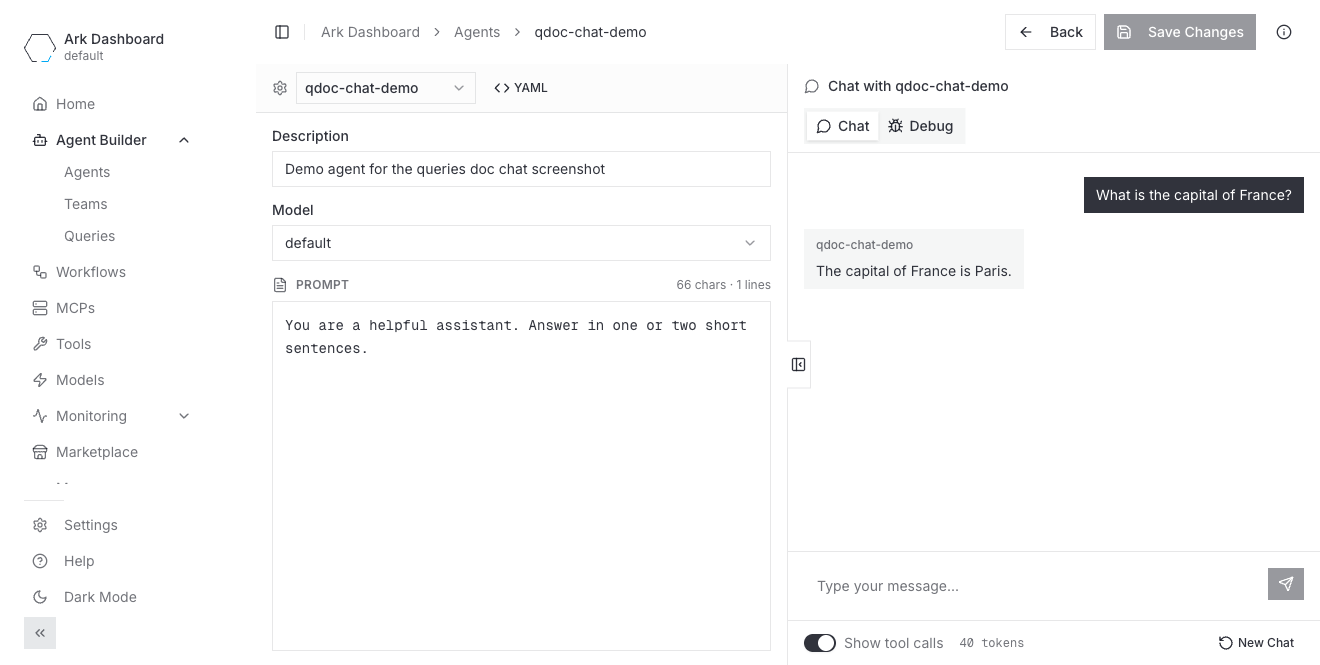
While a turn is in flight the Send button becomes a Stop button you can use to cancel. For teams, the panel also surfaces selector choices (<selector> chose <speaker>) and a Maximum turns reached (N) badge when maxTurns is hit.
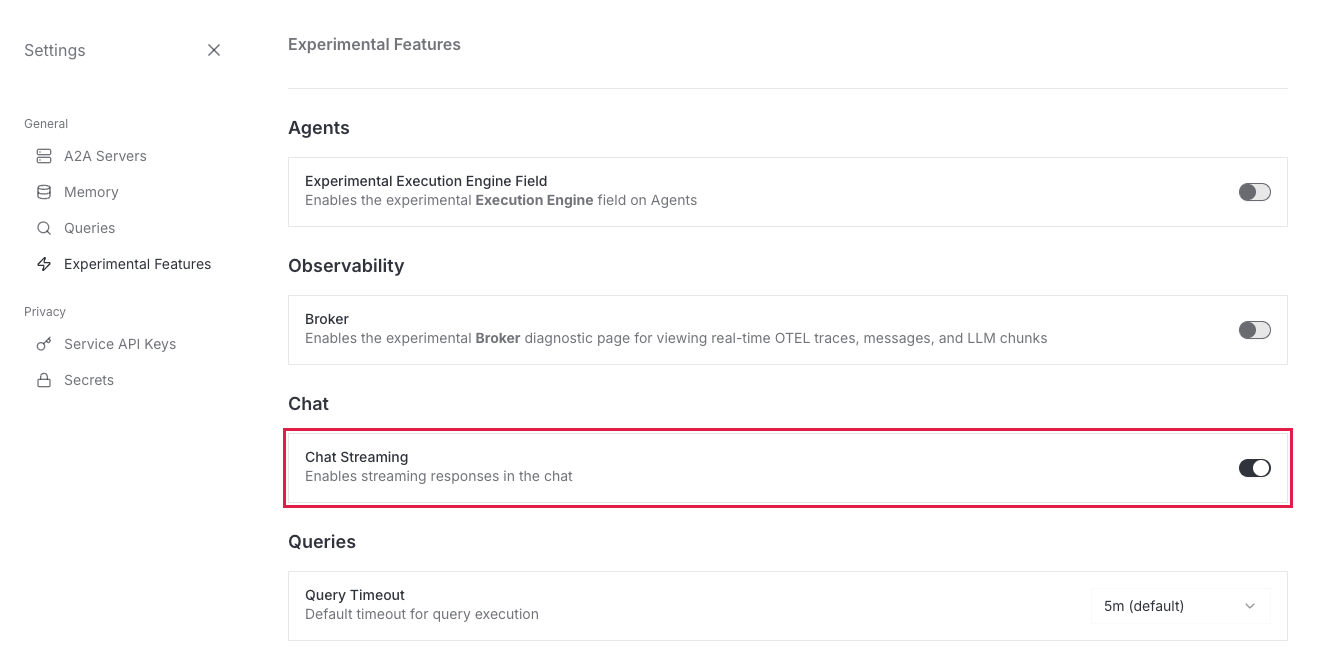
Streaming is gated behind an experimental feature. The chat panel streams the response token-by-token only when Chat Streaming is enabled under Settings → Experimental Features (it’s on by default). With it off, the panel waits for the full response and shows it in one go.
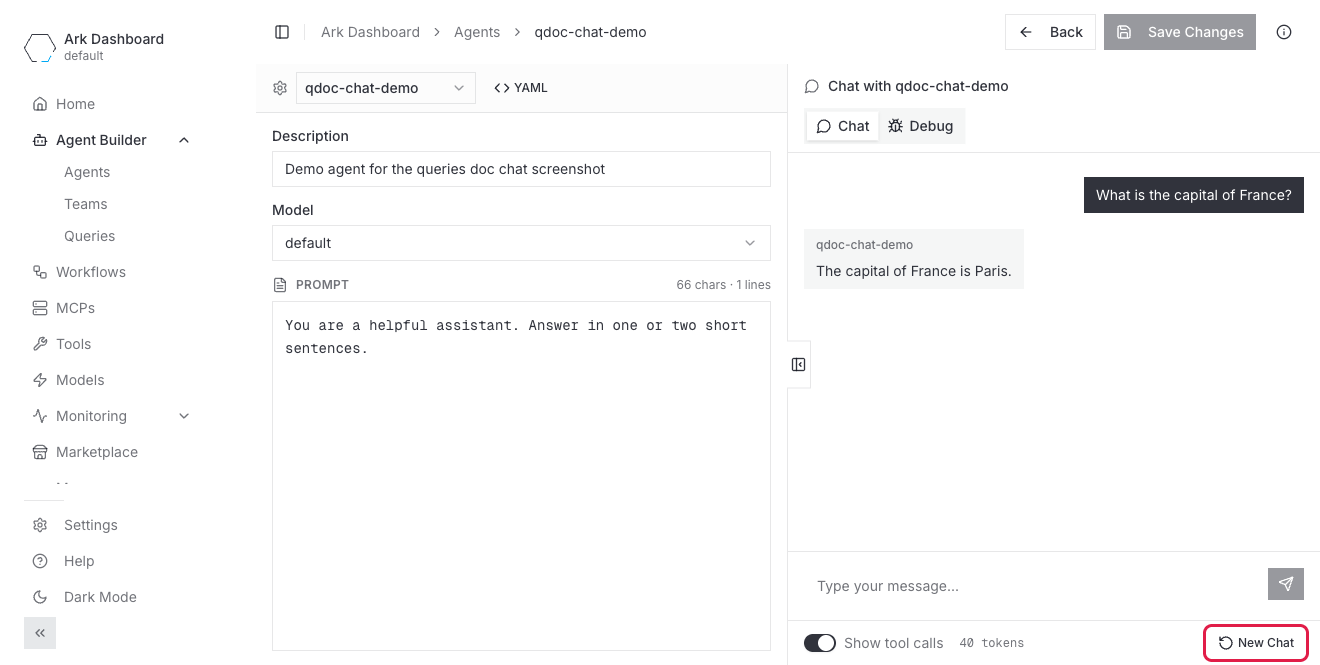
Each conversation has a New Chat action (bottom-right of the panel) that starts a fresh conversationId — click it to drop the current context and begin a new conversation with the same agent or team.
Create Query form
- Go to Agent Builder → Queries in the left nav and click New Query.
- Fill the editable fields, grouped into Query and Configuration columns:
| Column | Field | Notes |
|---|---|---|
| Query | Name | Optional. Auto-generated if blank. |
| Target | Required. Pick an agent, team, model, or tool. | |
| Session ID | Optional. Groups related queries for tracking and telemetry. Auto-generated if you leave it blank. | |
| Conversation ID | Optional. Threads multiple queries into one conversation. Auto-generated if you leave it blank. | |
| Configuration | Timeout | Default 30m. Format: 30s, 5m, 1h. |
| TTL | How long the Query resource sticks around after completing. Default comes from ArkConfig/default.spec.queryTTL (720h fallback). | |
| Memory | Optional. Pick a Memory resource so the conversation history is persisted under conversationId. | |
| Streaming | Stream the response into the Status & Results panel instead of waiting for the final message. | |
| Parameters | Free-form name → value pairs that fill {{.name}} placeholders in the input (and in agent prompts that declare a queryParameterRef). |
- Type the Input in the bottom panel, then hit Execute Query.
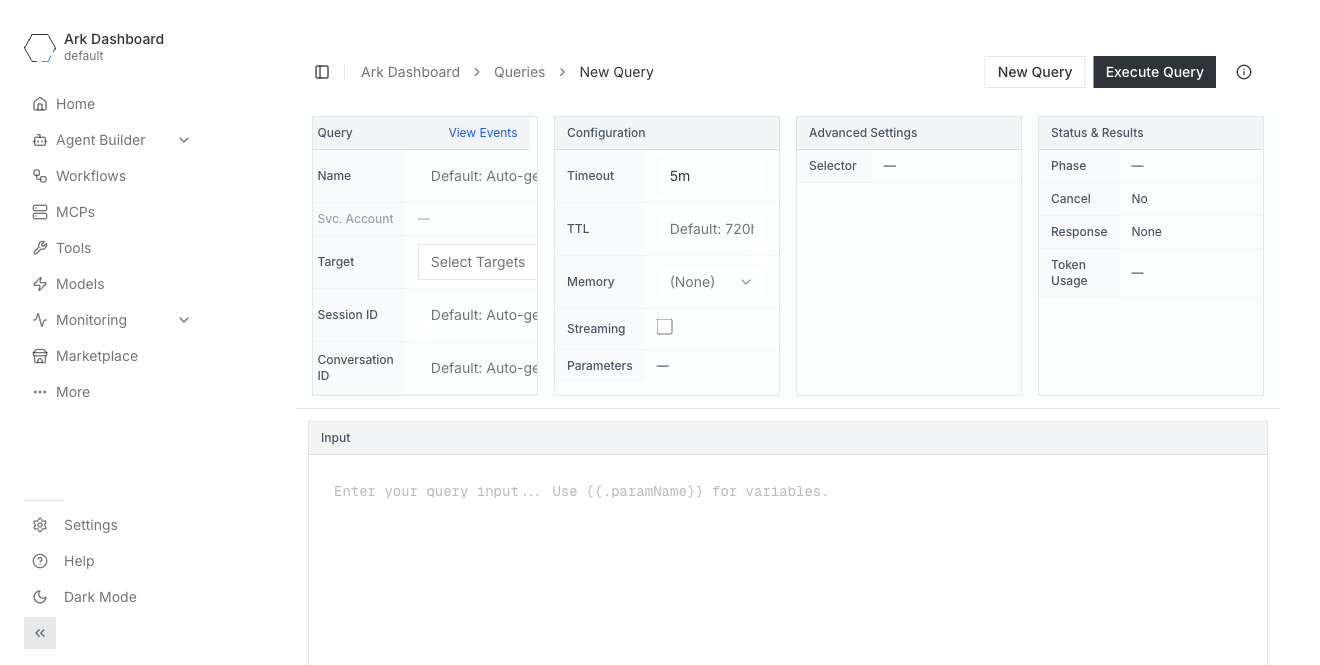
The Status & Results column on the right shows Phase, the assistant Response, and Token Usage once the query runs. The Advanced Settings column (Selector) and a few fields like Svc. Account and Cancel are shown but read-only in this form — they’re display-only views of Query fields you set via YAML (see Features only available in YAML).
Via kubectl
For a one-off query that runs immediately, use ark query <target> <message> where the target is agent/<name>, team/<name>, model/<name>, or tool/<name>:
ark query agent/my-agent "What is the capital of France?"
ark query team/my-team "Summarise the news on EVs."
ark query model/default "Explain rate limiting."
ark agents query <name> <message> is an equivalent shorthand for the agent case.
To author a query as a named resource (so you control its name, parameters, TTL, and can re-inspect it later), apply a Query:
cat <<'EOF' | kubectl apply -f -
apiVersion: ark.mckinsey.com/v1alpha1
kind: Query
metadata:
  name: hello-q1
spec:
  input: "What is the capital of France?"
  target:
    type: agent
    name: my-agent
EOF

# Watch it complete.
kubectl get query hello-q1 -w

# Read the assistant's final message.
kubectl get query hello-q1 -o jsonpath='{.status.response.content}'

# Or the full conversation as a JSON array of messages.
kubectl get query hello-q1 -o jsonpath='{.status.response.raw}'
kubectl get queries shows Type / Phase / Duration / Age columns.
Templated input + parameters
The input is a Go template. spec.parameters supply the values — inline, or pulled from a ConfigMap or Secret:
apiVersion: ark.mckinsey.com/v1alpha1
kind: Query
metadata:
  name: weather-q1
spec:
  input: "What's the weather in {{.city}}?"
  parameters:
    - name: city
      value: "Boston"                 # inline value
    - name: region
      valueFrom:
        configMapKeyRef:              # or pull from a ConfigMap
          name: geo-config
          key: default-region
  target:
    type: agent
    name: weather-agent
Parameters are resolved server-side before the input reaches the target — the agent sees What's the weather in Boston?, not the template. valueFrom also supports secretKeyRef (be deliberate: a secret resolved into the input becomes part of the prompt text the model receives). If the agent’s own prompt or system message declares a queryParameterRef, the same parameter values flow through there too — see Agents → Parameters in the prompt for that wiring.
Multi-turn conversations
To keep context across queries, set the same conversationId on every query in the chain:
apiVersion: ark.mckinsey.com/v1alpha1
kind: Query
metadata:
  name: greet-q1
spec:
  input: "Hi, my name is Alice."
  conversationId: chat-alice-001
  target:
    type: agent
    name: assistant
---
apiVersion: ark.mckinsey.com/v1alpha1
kind: Query
metadata:
  name: greet-q2
spec:
  input: "What's my name?"
  conversationId: chat-alice-001
  target:
    type: agent
    name: assistant
The second query sees the first one’s exchange and answers “Alice”. The dashboard chat panel handles this for you — every message you send in the same chat reuses the same conversationId until you click New Chat (highlighted in the screenshot above), which starts a fresh conversation.
Pick a target by label
Instead of naming a target, you can select one by label. This is useful when the concrete resource name varies by environment but a stable label doesn’t.
apiVersion: ark.mckinsey.com/v1alpha1
kind: Query
metadata:
  name: panel-q1
spec:
  input: "Should we ship this feature next sprint?"
  selector:
    matchLabels:
      role: reviewer
The selector resolves to a single target, not a fan-out. The controller looks for matching resources in this order and uses the first match it finds: Agents → Teams → Models → Tools. So if two agents carry role: reviewer, the query runs against whichever the controller lists first — it does not broadcast to both. To run the same input against several resources, create one query per target (or target a Team that coordinates them).
The admission webhook requires either target or selector — applying neither is rejected. If a selector matches nothing, the query fails with no matching resources found for selector.
Cancel a running query
Set spec.cancel: true on the Query (via kubectl edit or a patch) and the controller transitions it to phase: canceled:
kubectl patch query slow-q1 --type='merge' -p='{"spec":{"cancel": true}}'
kubectl get query slow-q1 -o jsonpath='{.status.phase}'   # canceled
The dashboard chat panel’s Stop button does the same thing for embedded chats.
Inspect, list, delete
ark queries list                       # quick list
kubectl get queries                    # full kubectl view (Type/Phase/Duration/Age)
kubectl describe query hello-q1        # conditions + token usage
kubectl get query hello-q1 -o yaml     # everything

kubectl delete query hello-q1
kubectl delete queries --all                          # delete every query in the namespace

# Bulk-delete only completed queries (status.phase isn't a field-selector, so filter with jq):
kubectl get queries -o json \
  | jq -r '.items[] | select(.status.phase=="done") | .metadata.name' \
  | xargs -r kubectl delete query
Token usage lands at .status.tokenUsage.{promptTokens,completionTokens,totalTokens} — handy for spot-checking costs.
Features only available in YAML
The dashboard’s Create Query form lets you set name, target, session/conversation IDs, timeout/TTL, memory, parameters, and the input. A few Query fields appear in the form as read-only / dimmed rows — you can see their value but not edit them there, so set them via YAML:
spec.serviceAccount(shown as Svc. Account) — the Kubernetes ServiceAccount used for RBAC during execution. Display-only in the form.spec.selector(shown under Advanced Settings → Selector asConfigured/—) — pick the target by label instead of by name (see Pick a target by label). Display-only in the form.spec.cancel(shown under Status & Results → Cancel asRequested/No) — a read-only view of the cancellation flag; the embedded chat exposes Stop, but setting it on a named Query is a YAML/patch operation (see Cancel a running query).spec.overrides— inject HTTP headers when the query’s target calls its model or any MCP server. Useful for upstream API gateways. Not shown in the form at all. See Overrides.
Troubleshooting
kubectl apply rejected by the admission webhook. Webhook errors come back in the apply output before the resource exists:
target or selector must be specified— every query needs one of the two. Setspec.targetorspec.selector.target references agent 'X' does not exist in namespace 'Y'— apply the referenced Agent/Team/Model/Tool first.target: unsupported type 'X'—target.typemust be one ofagent,team,model,tool.
phase: error. Read the response content for the underlying error:
kubectl get query my-q -o jsonpath='{.status.response.content}'Common causes:
- A2A / executor returned a 500 — usually the agent’s tools or model are misconfigured; check
kubectl describe agent <name>for the model/tool resolution path. - Timeout exceeded — bump
spec.timeout(default30m); see the Reference → Timeout.
Query never starts (phase: pending forever). The controller couldn’t dispatch — usually because the controller pod is restarting or the ark-completions executor isn’t reachable. kubectl get pods -n ark-system and check ark-controller + ark-completions are both Running.
Chat panel isn’t streaming token-by-token. Streaming is gated behind the Chat Streaming experimental feature (Settings → Experimental Features, on by default). If it’s off the panel waits for the full response. For external clients see Developer Guide → Streaming queries.
Need to debug what the agent actually saw? kubectl get query <name> -o jsonpath='{.status.response.raw}' returns the full message array (system prompt + user + assistant + any tool calls and results), which is what the dashboard’s Debug tab renders.
Next steps
- Reference → Query — full schema, every field, every phase.
- Agents → Pass parameter values at query time — wire query parameters into an agent’s prompt or system message.
- Memory — how the
memoryfield stores conversation history perconversationId.