Workflows
Workflows in Ark are Argo Workflows . Ark does not ship its own workflow engine — there’s no native “Ark workflow” CRD and no drag-and-drop workflow builder. You author Argo
WorkflowTemplate/WorkflowYAML, and steps that need to interact with Ark Agents, Teams, Models and Tools do so by submitting aQuery— usually by referencing the chart-providedark-querytemplate. Ark provides Helm charts and this reusable template to make those calls easy.
Why Argo?
Argo is a battle-tested workflow engine for running complex, distributed workflows on Kubernetes. It’s a good fit for orchestrating agentic processes with Ark because:
- Enterprise-grade security — standard Kubernetes patterns for services, RBAC, etc.
- Cloud-native / portable — runs on any Kubernetes environment.
- Open source — no vendor lock-in.
- Battle-tested — many years of production use.
- Isolation — containerised step execution is ideal for low-trust or isolated agentic operations.
Argo is a recommendation, not a requirement. Ark agents and teams are API-callable (via the
Queryresource or thearkCLI), so any workflow engine that can run a container or make an HTTP/Kubernetes call can orchestrate them — for example Temporal . Argo is the engine Ark ships ready-made charts and theark-toolsimage for; the patterns on this page apply to any engine.
What the dashboard does (and doesn’t) do
The Ark dashboard’s Workflow Templates page is read-only — it lists the Argo WorkflowTemplates in your namespace and renders their DAGs so you can see the shape of a pipeline. It is a viewer, not an editor:
- ✅ List templates, view details (entrypoint, steps), visualise the DAG (pan/zoom).
- ❌ No creating, editing, or composing workflows in the UI.
All workflow authoring is YAML. Write the WorkflowTemplate, kubectl apply it, and it appears in the dashboard for inspection and in Argo for execution.
Installing
This installs Argo in single-namespace mode within the Ark tenant namespace (typically default in development).
helm upgrade --install argo-workflows \
  oci://ghcr.io/mckinsey/agents-at-scale-ark/charts/argo-workflows

# Or, for local development:
cd services/argo-workflows
devspace dev

# Check status
kubectl get pods -l app.kubernetes.io/part-of=argo-workflows

# Port-forward to the Argo dashboard (automatic when using devspace).
kubectl port-forward svc/argo-workflows-server 2746:2746
# Dashboard: http://localhost:2746
Linking the Ark dashboard to the Argo UI
The Ark dashboard shows “Open in Argo” links on workflow templates, the Workflow Studio, and workflow runs. Set the Argo UI base URL on the ark-dashboard chart to enable them:
helm upgrade ark-dashboard ./services/ark-dashboard/chart --reuse-values \
  --set app.config.argoUrl=https://argo.example.com
The value is read at runtime, so a pod restart applies it without an image rebuild. When app.config.argoUrl is empty (the default), the dashboard hides all Argo links. With devspace, ENABLE_ARGO=true sets it to the localhost gateway URL.
Non-root workflow pods
Workflow pods run their argoexec init and wait containers from Argo’s non-root executor image (quay.io/argoproj/argoexec:<version>-nonroot, UID 8737), which is Argo’s recommended setting . Each step’s own container keeps the user its image declares, so steps running as root or any other UID still work.
It is enabled in services/argo-workflows/chart/values.yaml with argo-workflows.executor.image.nonroot: true, so the tag follows the Argo subchart version. Set runAsUser: 0 on the workflow pod security context to run the executor as root instead.
Minio artifact storage
Argo can use Minio to store workflow artifacts (intermediate outputs, logs, data files) for passing data between steps or preserving outputs. First install the Minio Operator:
helm upgrade minio-operator operator \
  --install \
  --repo https://operator.min.io \
  --namespace minio-operator \
  --create-namespace \
  --version 7.1.1

kubectl get pods -n minio-operator
Then enable Minio in the Argo Workflows chart:
helm upgrade --install argo-workflows \
  oci://ghcr.io/mckinsey/agents-at-scale-ark/charts/argo-workflows \
  --set minio.enabled=true

# Or for local development (select 'true' when prompted to enable Minio):
cd services/argo-workflows
devspace dev

kubectl get tenant   # check Minio tenant status
Adding the ark-query template to an existing Argo installation
The Ark argo-workflows chart ships a reusable ark-query WorkflowTemplate, a canonical building block that submits an Ark Query and returns its structured outputs. This can be referenced with templateRef: {name: ark-query, template: query}. The chart installs it automatically, so the steps above already give you everything. If you run your own Argo Workflows (installed separately from the Ark chart), add just this template.
The chart delivers the WorkflowTemplate inside a ConfigMap (a post-install hook Job applies it during a full chart install), so a standalone install renders the chart, extracts the WorkflowTemplate from that ConfigMap with yq, and applies it into the namespace where your workflows run:
helm template argo-workflows \
  oci://ghcr.io/mckinsey/agents-at-scale-ark/charts/argo-workflows \
  --show-only templates/ark-query-template.yaml \
  --namespace <your-argo-namespace> \
  | yq 'select(.kind == "ConfigMap") | .data["ark-query.yaml"]' \
  | kubectl apply -n <your-argo-namespace> -f -

# Verify the template is present.
kubectl get workflowtemplate ark-query -n <your-argo-namespace>WorkflowTemplates are namespace-scoped, so ark-query must live in the same namespace as the workflows that reference it. Applying the extracted WorkflowTemplate is idempotent - re-run the command to pick up template updates when you upgrade Ark.
How a step calls Ark
The chart-provided ark-query WorkflowTemplate is the recommended way to call Ark from a step. Reference it with templateRef — it submits an Ark Query, waits for completion, and exposes the result as parameter outputs, so you don’t hand-write any kubectl or CLI plumbing:
Inputs
| Parameter | Required | Default | Description |
|---|---|---|---|
target | Yes | - | type/name, where type is agent, team, model, or tool (e.g. agent/weather-agent). |
input | Yes | - | The message to send to the target. |
timeout | No | 30m | How long to wait for the Query to complete. |
parameters | No | [] | JSON array of {name,value} objects. |
ttl | No | (unset) | Time-to-live for the created Query. |
session-id | No | wf-<workflow-name> | Session ID to associate with the Query. |
conversation-id | No | (random UUID) | Conversation ID for the Query; a new one is generated per step run if unset. |
memory | No | (unset) | Name of the Memory resource to use. |
query-name | No | (auto-generated) | Name for the created Query. |
service-account | No | (unset) | ServiceAccount the Query runs under. |
Outputs
| Output | Source | Description |
|---|---|---|
response | .status.response.content | The target’s reply text. |
query-json | full Query object | The complete Query resource as JSON. |
phase | .status.phase | Final phase, either done or error. |
conversation-id | .status.conversationId | Conversation ID for the Query. |
Steps need a ServiceAccount with RBAC to create Queries — the samples set serviceAccountName: argo-workflow, which the chart provisions. The ark-query template is namespace-scoped and must exist in the same namespace as your workflow; the chart installs it automatically (see Adding the ark-query template for standalone Argo installs). The examples below are Argo step snippets — drop them into a WorkflowTemplate’s steps: list.
Invoke an agent
- name: ask-agent
  templateRef:
    name: ark-query
    template: query
  arguments:
    parameters:
      - name: target
        value: "agent/weather-agent"
      - name: input
        value: "What's the forecast for London?"
Read the reply from {{steps.ask-agent.outputs.parameters.response}}.
Invoke a team
Same shape — use a team/ target:
- name: ask-team
  templateRef:
    name: ark-query
    template: query
  arguments:
    parameters:
      - name: target
        value: "team/research-team"
      - name: input
        value: "Summarise the latest on EV battery chemistries."
Invoke a tool
Tools take a JSON object matching their inputSchema, passed as the input:
- name: call-tool
  templateRef:
    name: ark-query
    template: query
  arguments:
    parameters:
      - name: target
        value: "tool/get-coordinates"
      - name: input
        value: '{"city":"Paris"}'
Add conversation and session IDs
To thread history across steps, give them the same conversation-id - steps that share a conversation-id read and persist to the same conversation, so a later step sees earlier turns. Left unset, each step gets a fresh random conversation-id and starts a new conversation. To group several steps under one session for telemetry, set session-id. The workflow name makes a convenient stable ID across steps:
- name: ask-with-context
  templateRef:
    name: ark-query
    template: query
  arguments:
    parameters:
      - name: target
        value: "agent/assistant"
      - name: input
        value: "What's my name?"
      - name: conversation-id
        value: "{{workflow.name}}"   # shared thread → steps see each other's history
      - name: session-id
        value: "{{workflow.name}}"   # groups the steps for telemetry
On a standard install, a shared conversation-id threads history through the default Memory store; set the memory input as well only if you need a specific Memory resource. See Run queries → Multi-turn conversations for the underlying behaviour. session-id groups steps for telemetry only - it does not make them share history; conversation-id is what threads history. See Query → Conversation ID vs session ID for what each identifier does and when to set it.
When you need control the template doesn’t expose (e.g. custom labels or other Query spec fields), submit a raw Query from a step instead: kubectl apply a Query CR, kubectl wait --for=condition=Completed, then read .status.response.content. The legacy fark CLI (fark <agent|team|model|tool> <name> "<message>" in the ark-tools image) also still works for quick one-shot calls. Use fark, not ark, inside a workflow pod — the ark CLI port-forwards to ark-api, which the argo-workflow ServiceAccount can’t do.
Example: agents, teams, and deterministic steps together
Real Ark workflows mix LLM steps (agents/teams) with plain deterministic steps (containers that transform data, gate on conditions, or format output). The marketplace KYC demo bundle is a good reference: four sequential team steps feeding a final deterministic processing step.
This condensed WorkflowTemplate shows the shape — a sequential pipeline where each step queries a different resource, and a final non-LLM step formats the result:
apiVersion: argoproj.io/v1alpha1
kind: WorkflowTemplate
metadata:
  name: research-pipeline
  annotations:
    workflows.argoproj.io/description: "Agent → team → deterministic pipeline"
spec:
  entrypoint: main
  serviceAccountName: argo-workflow
  arguments:
    parameters:
      - name: topic
        value: "electric vehicle adoption in Europe"
  templates:
    - name: main
      steps:
        # Step 1 — an AGENT gathers raw material.
        - - name: research
            templateRef:
              name: ark-query
              template: query
            arguments:
              parameters:
                - name: target
                  value: "agent/research-agent"
                - name: input
                  value: "Research: {{workflow.parameters.topic}}"

        # Step 2 — a TEAM reviews and refines, seeing step 1's output.
        - - name: review
            templateRef:
              name: ark-query
              template: query
            arguments:
              parameters:
                - name: target
                  value: "team/review-team"
                - name: input
                  value: "Critique and tighten this research:\n{{steps.research.outputs.parameters.response}}"

        # Step 3 — a DETERMINISTIC step (no LLM) formats the final report.
        - - name: format
            template: format-report
            arguments:
              parameters:
                - name: body
                  value: "{{steps.review.outputs.parameters.response}}"

    # A plain container step — pure data transformation, no Ark call.
    - name: format-report
      inputs:
        parameters:
          - name: body
      script:
        image: alpine:3.19
        command: [sh]
        source: |
          echo "# Research Report"
          echo "Generated: $(date -u +%Y-%m-%dT%H:%M:%SZ)"
          echo
          echo "{{inputs.parameters.body}}"
Running workflows
Apply a template, then run it from the Argo dashboard or the argo CLI:
kubectl apply -f research-pipeline.yaml

# Run from the CLI.
argo submit --from workflowtemplate/research-pipeline -p topic="EV adoption in Europe"

# Watch progress and read results.
argo watch @latest
argo logs @latest
argo list workflows
From the Argo dashboard (http://localhost:2746), choose Workflows → New Workflow → From Template and pick your template.
# List templates if needed.
argo template list
Bundled samples
The Ark repo ships runnable templates under services/argo-workflows/samples/:
| Sample | Shows |
|---|---|
query-fanout-template.yaml | List models, fan out a parallel query per model, fan in and compare (quality, token count). |
ark-tools-template.yaml | Run a query via the fark CLI in a container and capture output. |
weather-workflow-template.yaml | Sequential agent queries passing results between steps. |
a2a-arithmetic-workflow.yaml | Combine A2A agents, Ark agents, and Python steps. |
minio-artifact-template.yaml | Pass artifacts between steps via Minio. |
log-paging-template.yaml | Node output longer and wider than one log page. |
log-tail-template.yaml | A long-running node that streams output slowly, then bursts. |
log-large-lines-template.yaml | Lines large enough to span runtime log chunks and exceed the page byte budget. |
log-fanout-template.yaml | Many pod nodes, each with a different amount of output. |
log-unavailable-template.yaml | Pods garbage collected on completion, so their logs are gone. |
kubectl apply -f services/argo-workflows/samples/query-fanout-template.yaml
argo submit --from workflowtemplate/query-fanout-template \
  -p question="Describe how to monitor argo workflows from the command-line"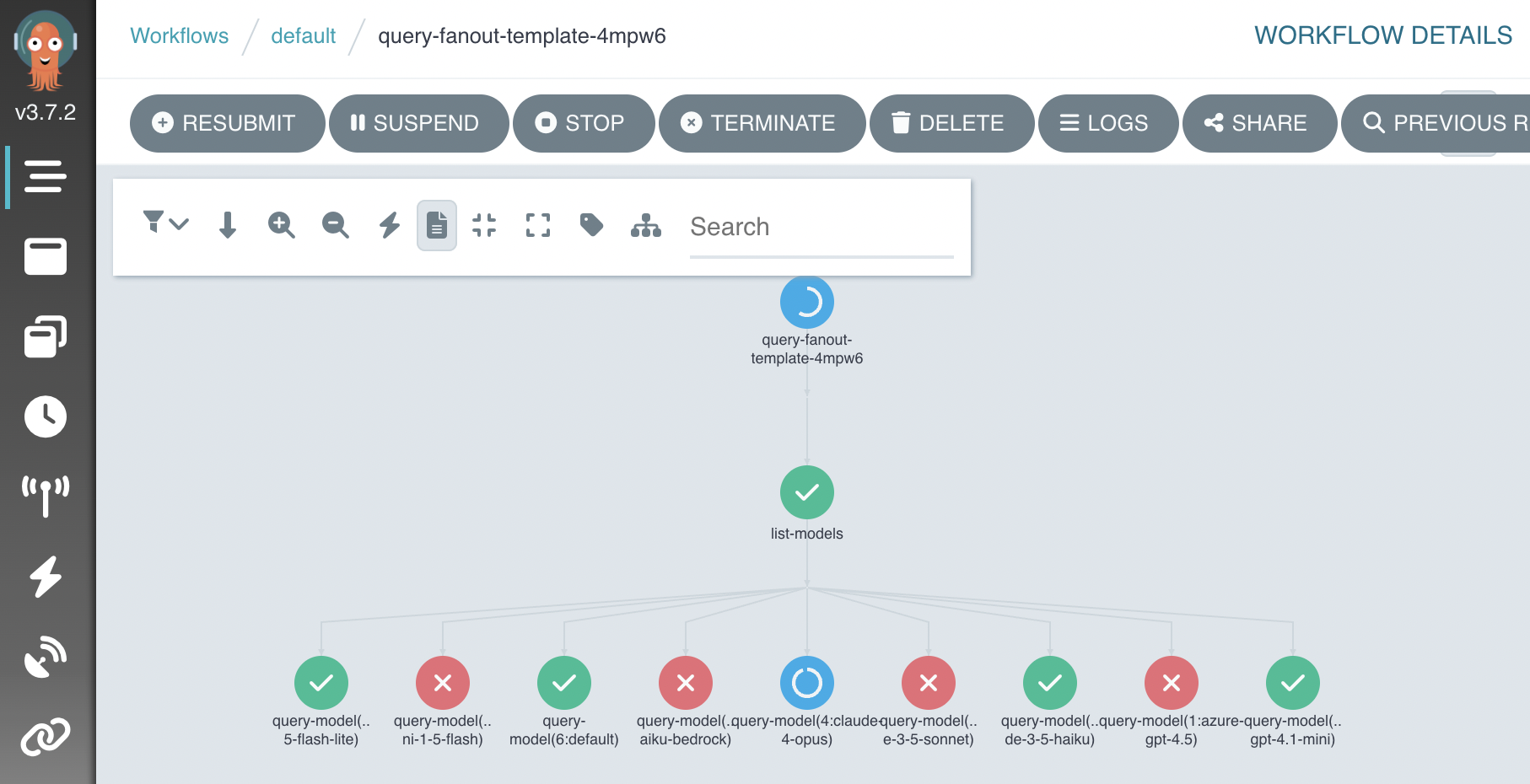
A2A arithmetic workflow
a2a-arithmetic-workflow.yaml combines A2A agents, Ark agents, and Python scripts. Install mock-llm with A2A support — it creates a countdown-agent that returns an A2A task counting down from a given number of seconds:
helm upgrade --install mock-llm oci://ghcr.io/dwmkerr/charts/mock-llm \
  --set ark.a2a.enabled=true

kubectl get a2aserver mock-llm-countdown
# NAME                   ADDRESS                                                 READY
# mock-llm-countdown     http://mock-llm:6556/a2a/agents/countdown-agent         true

kubectl apply -f services/argo-workflows/samples/a2a-arithmetic-workflow.yaml
argo submit --from workflowtemplate/a2a-arithmetic-workflow -p a="2" -p b="3"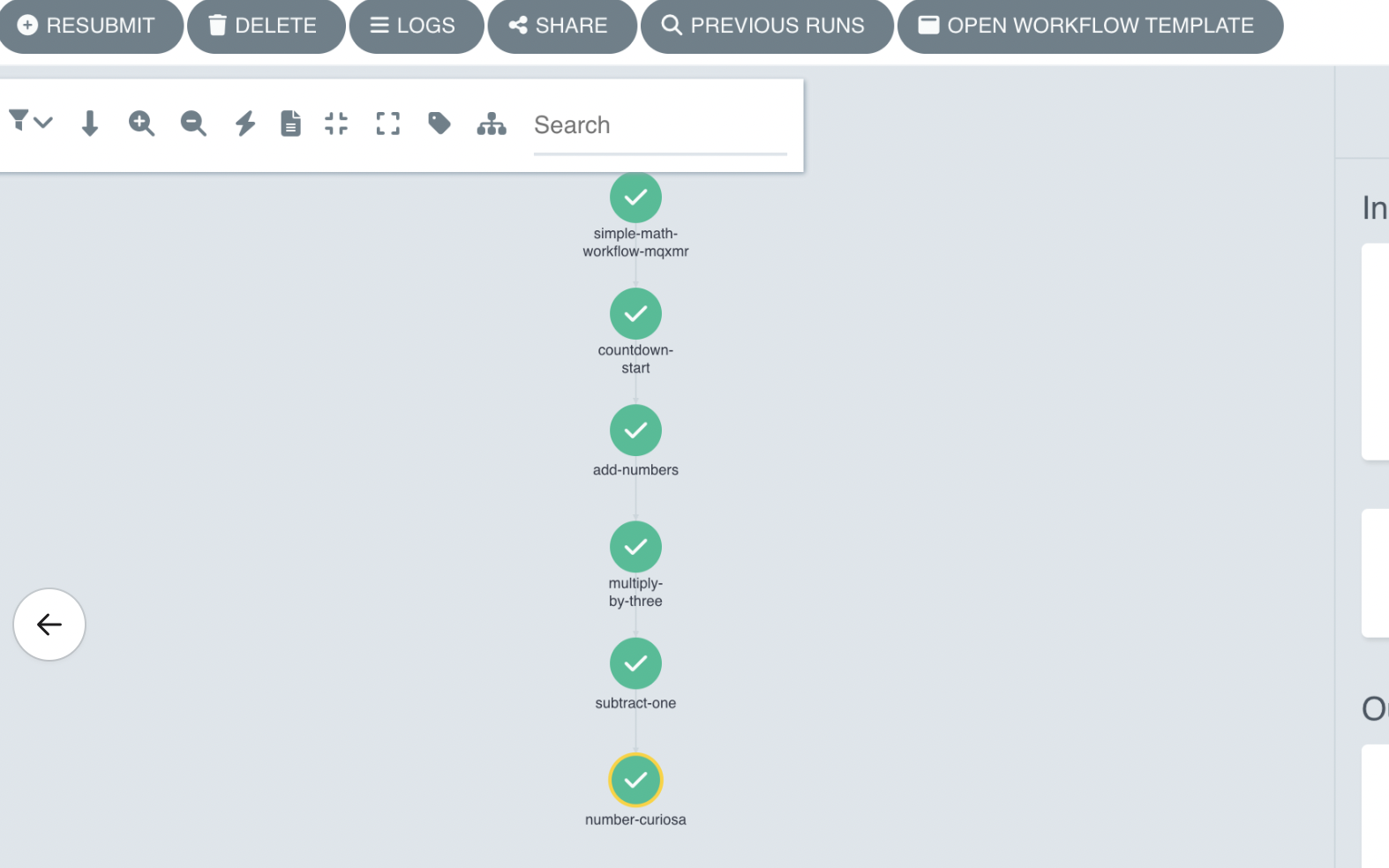
For larger end-to-end examples (multi-team DAGs writing reports via the file-gateway), see the marketplace demo bundles: kyc-demo-bundle and cobol-modernization-bundle .
Workflow node log samples
The five log-* templates exist to demo the node log viewer in the Ark dashboard. Apply them all, then submit the ones you need:
kubectl apply -f services/argo-workflows/samples/log-paging-template.yaml \
  -f services/argo-workflows/samples/log-tail-template.yaml \
  -f services/argo-workflows/samples/log-large-lines-template.yaml \
  -f services/argo-workflows/samples/log-fanout-template.yaml \
  -f services/argo-workflows/samples/log-unavailable-template.yaml

argo submit --from workflowtemplate/log-paging-template
argo submit --from workflowtemplate/log-tail-template
Open Sessions in the Ark dashboard, pick the run, and expand a step to reach its logs.
| Template | What to look for |
|---|---|
log-paging-template | The bulk-output node holds 5000 lines against a 1000-line page. Scroll up to load older pages until Start of log appears. The wide-output node scrolls sideways instead of wrapping, and short-output reaches the start of its log immediately. |
log-tail-template | While stream runs, new lines arrive on each poll and the viewport stays pinned to the bottom. Scroll up and it stops following. A final burst lands on the last poll after the node finishes. |
log-large-lines-template | chunk-spanning emits 200KB lines, which arrive across several runtime log chunks and must be reassembled. oversized-line emits one line past the page byte budget, and byte-capped-page fills a page past it, so both report that lines were dropped. |
log-fanout-template | Each shard emits a different number of lines. Switching between nodes resets the viewport, and collapsing then reopening a node restores its scroll position. Submit with -p shards=24 to push past the buffer cache limit. |
log-unavailable-template | podGC deletes each pod on completion, so the viewer reports that logs are unavailable and offers the Argo UI link when app.config.argoUrl is set. One node fails on purpose. |
Page size, byte budget, and poll interval come from NEXT_PUBLIC_WORKFLOW_LOG_PAGE_LINES, NEXT_PUBLIC_WORKFLOW_LOG_MAX_BYTES, and NEXT_PUBLIC_WORKFLOW_LOG_POLL_INTERVAL_MS. Lower NEXT_PUBLIC_WORKFLOW_LOG_PAGE_LINES to make paging easier to see on smaller runs.
Viewing templates in the Ark dashboard
Once applied, open Workflow Templates in the dashboard sidebar to inspect a template:
- Template list — name, description (from the
workflows.argoproj.io/descriptionannotation), creation time. - DAG visualisation — nodes (steps), edges (dependencies), hierarchical top-to-bottom layout, pan and zoom.
- Template info — namespace, entrypoint, the available template definitions.
To run a template, use the Argo dashboard or the argo CLI — the Ark dashboard only visualises.
Uninstalling
# Helm install
helm uninstall argo-workflows

# Or, if using devspace
devspace purge
By default the Argo chart does not remove the Argo CRDs, to avoid accidental data loss. (Re-installing into a different namespace will clash unless you remove them.) To delete all Argo CRDs — and every workflow, template, and related object:
kubectl get crd -o name | grep argoproj.io | xargs kubectl deleteIf you enabled Minio:
helm uninstall minio-operator --namespace minio-operator
# Removing Minio CRDs deletes stored artifacts:
kubectl get crd -o name | grep min.io | xargs kubectl delete
Troubleshooting
# List workflows
kubectl get workflows

# Logs for the latest run
argo logs @latest
If an Ark step fails, inspect the Query it created — workflows label them with the workflow name:
kubectl get queries -l workflow=<workflow-name>
kubectl get query <name> -o jsonpath='{.status.response.content}'
Related
- Run queries / chat with agents and teams — the
Queryresource these steps create. ark-toolsimage — the CLI image used in workflow steps.- Ark API — Generic Resources API — access workflow templates via the API.