Ark API
The ark-api service exposes a REST interface for executing queries and managing resources. This page covers the base URL, authentication, conventions, the query workflow, and a reference of every endpoint group. Messages, chunks, traces, events, and sessions are served separately by the broker — see the Broker Service.
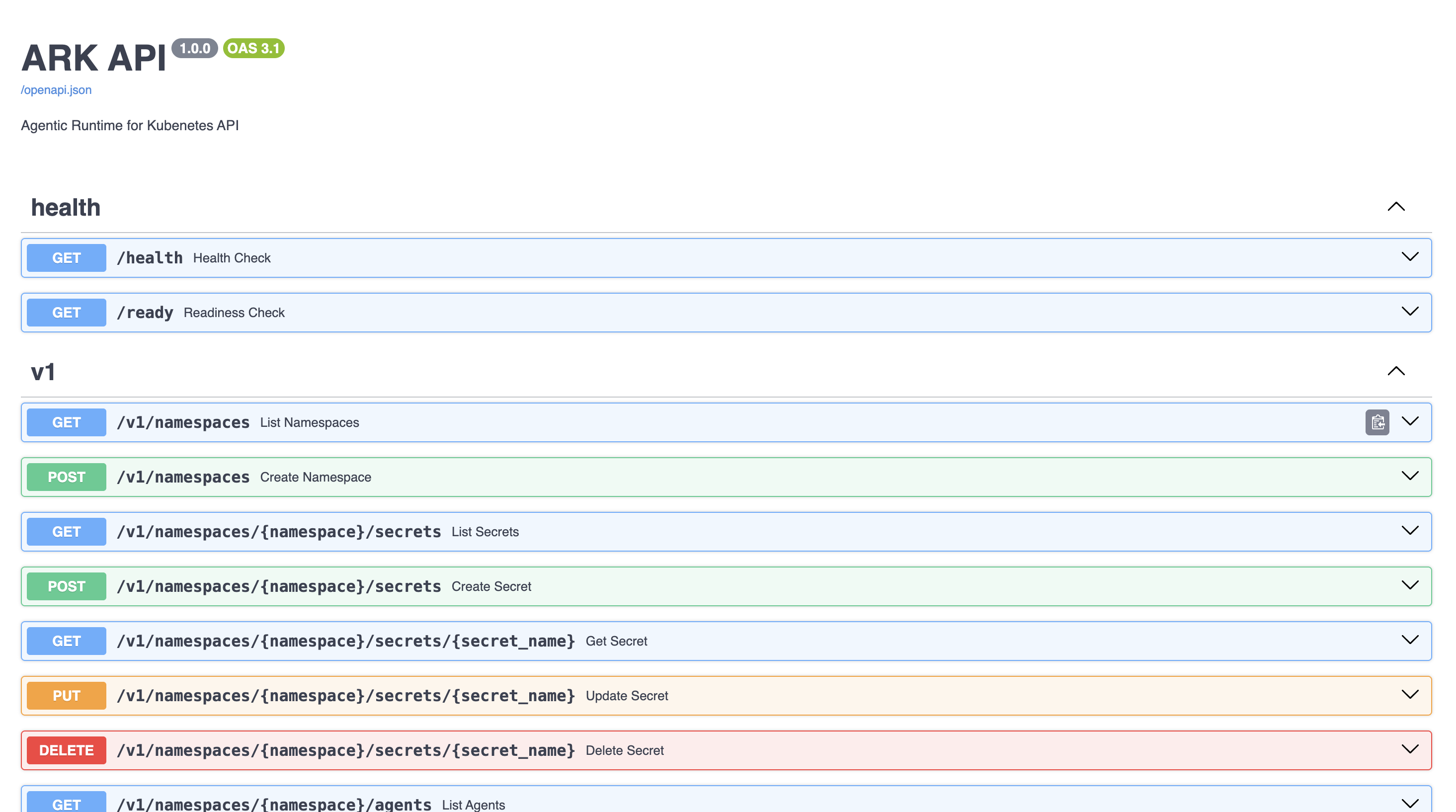
The authoritative, always-current reference is the built-in OpenAPI spec (/openapi.json) and its Swagger UI (/docs). Use this page for orientation and the endpoint index; use Swagger for full request/response schemas.
Base URL and interactive explorer
The API is served by the ark-api service. To reach it:
- In-cluster:
http://ark-api.<namespace>.svc.cluster.local(default port 80). - Local dev:
kubectl port-forward svc/ark-api 8000:80, then usehttp://localhost:8000. Or runark routes/devspace run routesto get a gateway URL such asark-api.default.127.0.0.1.nip.io:8000.
Open the Swagger UI at /docs to browse and try every endpoint:
Authentication
Ark APIs support multiple authentication methods depending on the AUTH_MODE configuration:
- OIDC/JWT — for dashboard users (
AUTH_MODE=ssoorhybrid). - API keys — for service-to-service communication (
AUTH_MODE=basicorhybrid). - No authentication — for development (
AUTH_MODE=open).
For programmatic access, create an API key and use HTTP Basic auth:
# Create a key
curl -X POST http://localhost:8000/v1/api-keys \
  -H "Content-Type: application/json" \
  -d '{"name": "My Service Key"}'

# Use it
curl -u "pk-ark-xxxxx:sk-ark-xxxxx" http://localhost:8000/v1/agents
JWT bearer tokens are also accepted: -H "Authorization: Bearer <token>". See the Authentication Guide for full configuration.
Conventions
A few conventions apply across the API:
- Namespace is a query parameter, not a path segment. Pass
?namespace=<name>to scope a request; it defaults to the API’s current context namespace. For exampleGET /v1/agents?namespace=team-a— there is no/v1/namespaces/{namespace}/agentspath. - Two response shapes. The typed resource endpoints (
/v1/agents,/v1/queries, …) return simplified JSON objects (flat fields likename,namespace,status), not raw Kubernetes manifests. The generic Resources API returns raw Kubernetes objects (apiVersion,kind,metadata,spec,status). - List responses wrap results in
{ "items": [ ... ] }. - Content negotiation — the generic Resources API returns JSON by default or YAML with
Accept: application/yaml.
Queries
Queries are the primary way to interact with Ark: POST /v1/queries sends input to any agent, team, model, or tool.
List available targets
curl http://localhost:8000/v1/agents
curl http://localhost:8000/v1/models
curl http://localhost:8000/v1/teams
curl http://localhost:8000/v1/tools
Run a query
POST /v1/queries is asynchronous — it creates the query and returns immediately, before execution finishes. Poll GET /v1/queries/{name} until status.phase is done (or error/canceled), then read status.response.content. (For token-by-token output, stream instead — see Streaming Responses.)
Python
import requests, time

base = "http://localhost:8000"

# 1. Create the query (returns immediately)
requests.post(f"{base}/v1/queries", json={
    "name": "my-query",
    "input": "Hello, how can you help me?",
    "target": {"type": "agent", "name": "my-agent"},
}).raise_for_status()

# 2. Poll until it finishes
while True:
    q = requests.get(f"{base}/v1/queries/my-query").json()
    phase = q["status"].get("phase")
    if phase in ("done", "error", "canceled"):
        break
    time.sleep(1)

print(q["status"]["response"]["content"])The completed query looks like this (fields are flat, not nested under spec/metadata):
{
  "name": "my-query",
  "namespace": "default",
  "input": "Hello, how can you help me?",
  "target": {"type": "agent", "name": "my-agent"},
  "conversationId": "conv-abc123",
  "status": {
    "phase": "done",
    "response": {"content": "Hello! How can I help you today?"},
    "conversationId": "conv-abc123",
    "tokenUsage": {"promptTokens": 1317, "completionTokens": 43, "totalTokens": 1360}
  }
}
Query fields
| Field | Required | Description |
|---|---|---|
name | Yes | Unique query name |
input | Yes | The user message text |
target | Yes* | Target with type (agent/team/model/tool) and name. Omit to use selector |
selector | No | Label selector to match a target instead of naming one |
type | No | Input type, defaults to "user" |
conversationId | No | Continue a previous conversation |
sessionId | No | Group queries for telemetry tracking |
parameters | No | Values used in the input or passed to agent parameters via queryParameterRef |
memory | No | A Memory resource for conversation context |
timeout | No | Query timeout, e.g. "5m" |
metadata.annotations | No | Custom Kubernetes annotations on the query |
Conversations
Pass the conversationId returned in status.conversationId to a later query to continue the thread — the memory service manages history automatically.
CONV=$(curl -s http://localhost:8000/v1/queries/my-query | jq -r .status.conversationId)

curl -X POST http://localhost:8000/v1/queries \
  -H "Content-Type: application/json" \
  -d "{
    \"name\": \"followup\",
    \"input\": \"And its population?\",
    \"target\": {\"type\": \"agent\", \"name\": \"my-agent\"},
    \"conversationId\": \"$CONV\"
  }"
Query different targets
The same request works for agents, teams, models, and tools — only target.type changes:
Agent
{"name": "q", "input": "Weather in NYC?", "target": {"type": "agent", "name": "weather-agent"}}Cancel a query
curl -X PATCH http://localhost:8000/v1/queries/my-query/cancelEndpoint reference
All endpoints are under /v1 and accept ?namespace=. This is a map of the surface — see /docs for full schemas.
Resources
Standard CRUD (GET/POST on the collection, GET/PUT/DELETE on the item):
| Resource | Endpoints |
|---|---|
| Agents | /v1/agents, /v1/agents/{name} |
| Teams | /v1/teams, /v1/teams/{name} |
| Models | /v1/models, /v1/models/{name} |
| Memories | /v1/memories, /v1/memories/{name} |
| Secrets | /v1/secrets, /v1/secrets/{name} |
| MCP servers | /v1/mcp-servers, /v1/mcp-servers/{name} (no PUT) |
| Tools | /v1/tools, /v1/tools/{name} (read/delete only — tools are created from MCP servers) |
| A2A servers | /v1/a2a-servers, /v1/a2a-servers/{name} (read/delete only) |
| A2A tasks | /v1/a2a-tasks, /v1/a2a-tasks/{name} (read/delete only) |
| Events | /v1/events, /v1/events/{name} (read only — Kubernetes events) |
| ArkConfig | /v1/arkconfig (GET/PUT/DELETE) |
| Namespaces | /v1/namespaces (GET/POST) |
Queries and conversations
| Purpose | Endpoints |
|---|---|
| Queries | GET/POST /v1/queries, GET/PUT/DELETE /v1/queries/{name}, PATCH /v1/queries/{name}/cancel |
| Conversations | GET/DELETE /v1/conversations, DELETE /v1/conversations/{id}, DELETE /v1/conversations/{id}/queries/{query_id}/messages |
| Memory messages | GET /v1/memory-messages, GET /v1/memories/{name}/conversations/{id}/messages |
Broker data
Telemetry the broker captures for a namespace. (The broker’s own HTTP API, including OTLP trace ingestion, is documented under the Broker Service.)
| Data | Endpoints |
|---|---|
| Chunks | GET /v1/broker/chunks |
| Events | GET /v1/broker/events, GET /v1/broker/events/{query_id} |
| Messages | GET /v1/broker/messages |
| Sessions | GET /v1/broker/sessions, GET /v1/broker/sessions/{id} |
| Traces | GET /v1/broker/traces, GET /v1/broker/traces/{id} |
MCP authorization
| Purpose | Endpoints |
|---|---|
| OAuth flow | POST /v1/mcp-servers/{name}/auth/start, GET /v1/mcp-servers/{name}/auth/status, POST /v1/mcp-servers/{name}/auth/logout |
| Callback | GET /v1/mcp/auth/callback |
Marketplace and services
| Purpose | Endpoints |
|---|---|
| Ark services | GET /v1/ark-services, GET /v1/ark-services/{name}, GET /v1/ark-services/marketplace-items |
| Marketplace sources | GET/POST /v1/namespaces/{ns}/marketplace-sources, GET/PATCH/DELETE /v1/namespaces/{ns}/marketplace-sources/{name}, GET /v1/namespaces/{ns}/marketplace-sources/permissions |
| Marketplace items | GET /v1/namespaces/{ns}/marketplace-items |
| Service proxy | GET/POST /v1/proxy/{resource}/{server_name} (and /{path}), GET /v1/proxy/services, PATCH/DELETE /v1/proxy/services/{service_name}/{api_path} |
System and utilities
| Purpose | Endpoints |
|---|---|
| Context | GET /v1/context — current namespace and permissions |
| System info | GET /v1/system-info |
| Export | POST /v1/export/resources, GET /v1/export/last-export-time |
| File preview | POST /v1/file-preview/spreadsheet |
| A2A gateway | GET /a2a/agents — discover agents over A2A |
| Health | GET /health, GET /ready |
| API keys | GET/POST /v1/api-keys, DELETE /v1/api-keys/{public_key} |
Generic Resources API
The generic endpoint returns raw Kubernetes objects for the resources the dashboard needs that have no typed endpoint. It serves a fixed allowlist of (group, version, Kind, verb) tuples and returns 403 for everything else, before any Kubernetes call.
| Kind | Group / version | Operations |
|---|---|---|
WorkflowTemplate | argoproj.io/v1alpha1 | list, get, create, update, delete |
Workflow | argoproj.io/v1alpha1 | list, get, create |
Agent, Team | ark.mckinsey.com/v1alpha1 | get |
ExecutionEngine | ark.mckinsey.com/v1prealpha1 | list, get, delete |
Service | core v1 | list |
Secrets, ConfigMaps, and ServiceAccounts are never served. Use the typed endpoints, such as /v1/secrets, instead.
Endpoints
GET                 /v1/resources/api/{version}/{kind}
GET|POST            /v1/resources/apis/{group}/{version}/{kind}
GET|PUT|DELETE      /v1/resources/apis/{group}/{version}/{kind}/{resource_name}
Examples:
curl "http://ark-api:8000/v1/resources/api/v1/Service?labelSelector=app.kubernetes.io/instance=phoenix"
curl http://ark-api:8000/v1/resources/apis/argoproj.io/v1alpha1/WorkflowTemplate/my-workflow
curl http://ark-api:8000/v1/resources/apis/ark.mckinsey.com/v1alpha1/Agent/my-agent
There are also log endpoints for pods and Argo workflow nodes: GET /v1/resources/api/v1/namespaces/{namespace}/pods/{pod_name}/log, GET /v1/resources/apis/argoproj.io/v1alpha1/namespaces/{namespace}/workflows/{workflow_name}/{node_id}/log, and their /log/window variants. They only serve pods that an Argo workflow created, identified by the workflows.argoproj.io/workflow label, and return 404 for any other pod. The node endpoints look for the node only among the pods of the workflow named in the path.
Parameters
| Parameter | Description | Default |
|---|---|---|
namespace | Kubernetes namespace | Current context namespace |
labelSelector | Label selector for list operations | None |
curl "http://ark-api:8000/v1/resources/apis/argoproj.io/v1alpha1/Workflow?namespace=production"Response format
Responses return the raw Kubernetes resource. Content negotiation via the Accept header returns JSON (default) or YAML:
curl -H "Accept: application/yaml" \
  http://ark-api:8000/v1/resources/apis/argoproj.io/v1alpha1/WorkflowTemplate/my-workflow
Identity and RBAC
The identity that reaches Kubernetes depends on how the request is authenticated:
- Requests in
openmode and requests authenticated with an API key run as the Ark API service account. - Signed-in users, in
ssomode or with a JWT inhybridmode, run as themselves when user impersonation is enabled, and as the service account when it is not.
Writes are stricter. Creating, updating, or deleting through this endpoint can make Argo run containers, so a signed-in user’s write always runs as that user. It returns 403 when impersonation is disabled, and it is never retried as the service account, even when impersonation fallback is enabled. Reads keep the behavior above, so with impersonation disabled a signed-in user can still read these resources through the API.
POST /v1/resources/access-review reports these refusals. For a write the endpoint would refuse, it returns allowed: false with a reason, without asking Kubernetes.
The service account needs RBAC permissions for the resources it serves. Reading logs needs get on pods as well as on pods/log.