Quickstart
Get Ark running on a local Kubernetes cluster, verify the install, then open the dashboard and create your first model and agent.
1. Prerequisites
Ark runs on a Kubernetes cluster and is managed with the ark CLI. You’ll need:
| Requirement | Notes |
|---|---|
| A Kubernetes cluster | Minikube , Kind , or Docker Desktop , with ≥ 2 CPU and 4 GiB RAM free. |
| Node.js (18+) | Provides npm, used to install the ark CLI. |
| Helm | Ark installs its components as Helm releases. |
| kubectl | Configured to talk to your cluster (kubectl get nodes should work). |
| An LLM API key | OpenAI, Azure OpenAI, or Anthropic — for the model you create in step 4. |
Install the ark CLI:
npm install -g @agents-at-scale/arkark bundles a status check (next section) that flags anything missing.
2. Install Ark
With your cluster running and kubectl pointed at it:
ark installPin a version with
ark install --ark-version 0.1.50. If the version doesn’t exist, install continues with a warning. See GitHub releases for available versions. For per-component installs, RBAC, and remote clusters, see Deploying Ark.
3. Verify the installation
Run the built-in status check:
ark statusIt reports system dependencies, cluster access, and the health of each Ark service:
system dependencies:
  ✓ installed node v22.0.0
  ✓ installed kubectl v1.33
  ✓ installed helm v3.18.4
  ✓ installed minikube v1.36.0

cluster access:
  ✓ accessible minikube default minikube

ark services:
  ✓ healthy ark-api default 1/1 replicas ready
  ✓ healthy ark-dashboard default 1/1 replicas ready
  ✓ healthy ark-mcp default 1/1 replicas ready
  ✓ healthy ark-broker default 1/1 replicas ready

ark status:
  ✓ ready ark-controller ark-system 1/1 replicas ready
  ● default model not available
A default model not available line is expected at this stage — you’ll add one next. You can also check with kubectl:
kubectl get pods -n ark-system
kubectl get pods -n default
4. Open the dashboard, add a model, and add an agent
Open the dashboard
ark dashboardThis opens the Ark dashboard in your browser.
Add a model
Agents need a model. The conventional first model is named default — agents that don’t pin a model fall back to it.
- Go to Models in the left nav and click Add Model.
- Fill the form:
| Field | Value |
|---|---|
| Name | default |
| Provider | e.g. OpenAI |
| Model | e.g. gpt-4o-mini |
| API Key | Hit Add New to create a secret with your API key |
| Base URL | The provider’s API URL |
- Hit Create Model.
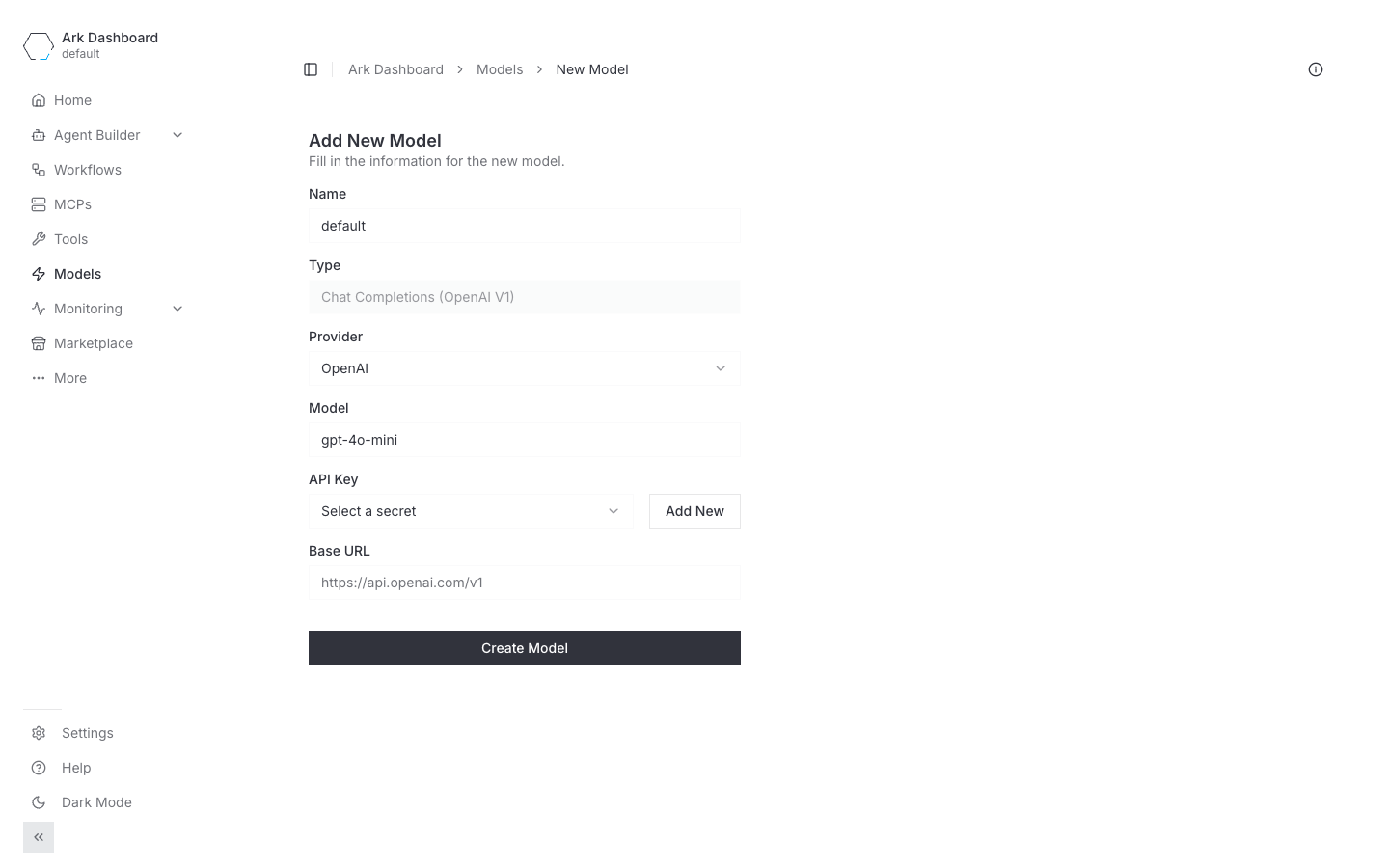
See Models for every provider and field.
Prefer the CLI?
ark models create defaultwalks you through the same setup interactively.
Add an agent
- Go to Agent Builder → Agents in the left nav and click Create Agent.
- Fill the form:
| Field | Notes |
|---|---|
| Name | Required. Lowercase, k8s name rules. |
| Agent Prompt | The system prompt, e.g. “You are a helpful assistant. Answer concisely.” |
| Description | Shown in the agent list and team picker. |
| Model | Leave as None (Unset) to use the default model you just created. |
| Tools | Optional — a checklist grouped by source. |
- Hit Create Agent.
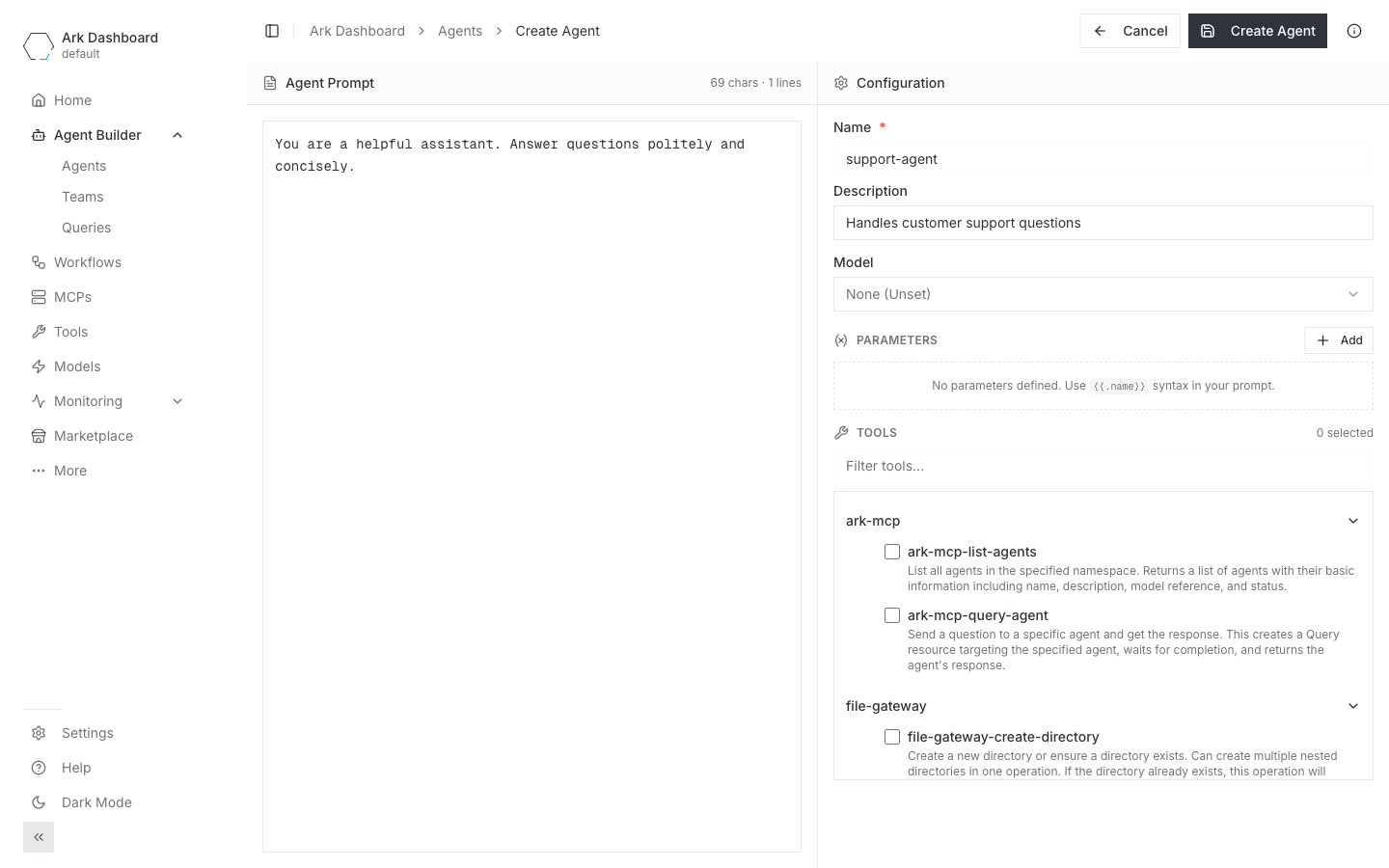
Try it
Open the agent and use the chat panel on the right, or run a query from the CLI:
ark query agent/my-agent "What is the capital of France?"Next steps
- Models — every provider, auth method, and field.
- Agents — prompts, parameters, tools, and execution engines.
- Run queries / chat with agents and teams — multi-turn conversations, parameters, and the API.
- Troubleshooting — common install and runtime issues.