Agents
An Agent wraps a model with a system prompt and a set of tools, producing a reusable component you can query directly or from a team. The full schema reference (every field, every option) lives at Reference → Agents. This page walks you through creating, modifying, and querying agents.
Minimum viable agent
apiVersion: ark.mckinsey.com/v1alpha1
kind: Agent
metadata:
  name: support-agent
spec:
  description: Handles customer support questions
  prompt: |
    You are a helpful assistant. Answer questions politely and concisely.
That’s enough to apply. With no modelRef, the agent uses the model named default in the same namespace. Set up a default model first if you haven’t.
Create an agent
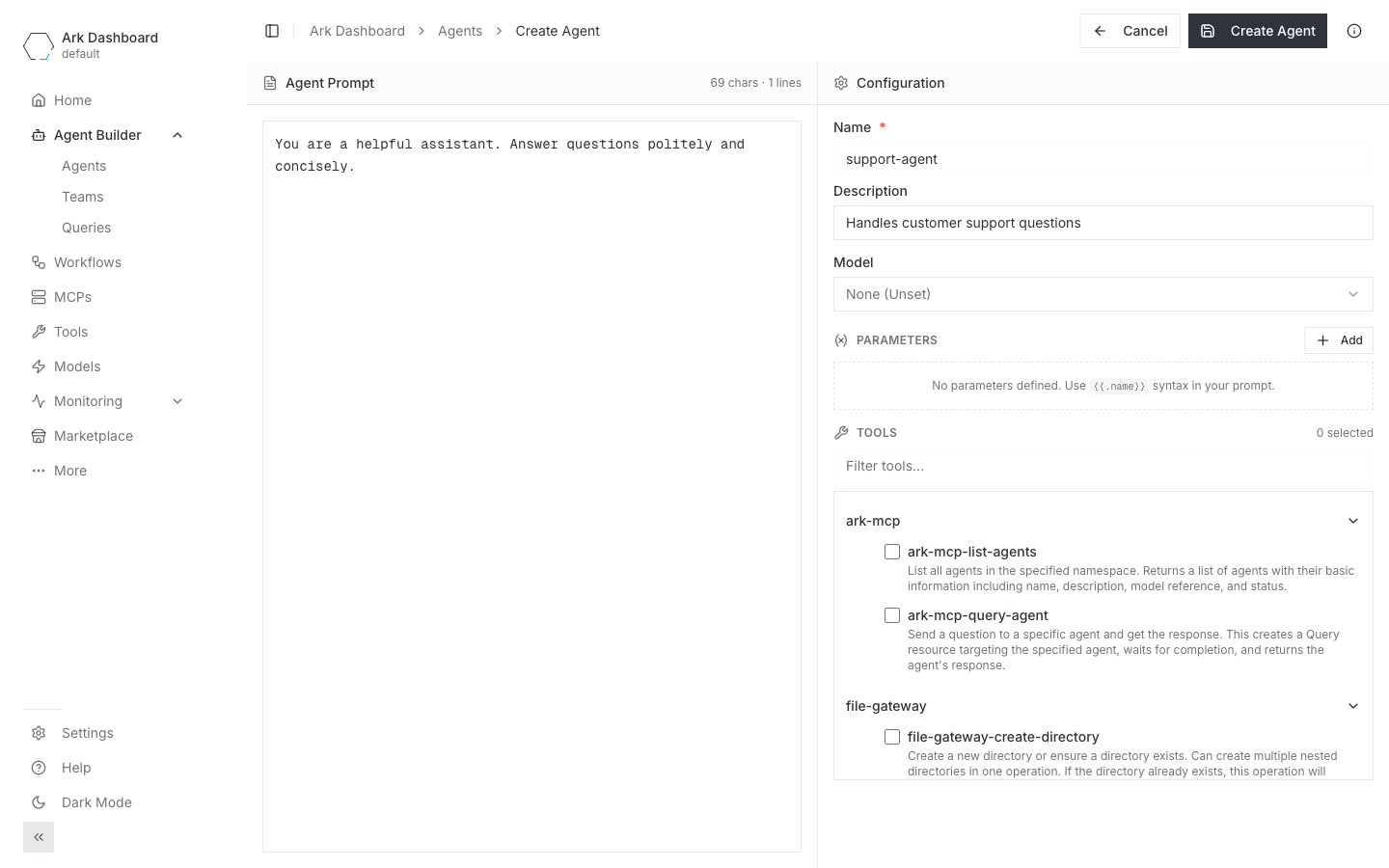
Via Dashboard
- Launch the dashboard:
ark dashboard. - Go to Agent Builder → Agents in the left nav and click Create Agent.
- Fill the form:
| Field | Notes |
|---|---|
| Agent Prompt | The system prompt. Use {{.paramName}} placeholders for template variables. |
| Name | Required. Lowercase, k8s name rules. |
| Description | Shown in the agent list and team picker. |
| Model | Picks from existing Models in the namespace. Leave as None (Unset) to use default. |
| Parameters | Add {name, value} pairs that fill in the {{.name}} placeholders in the prompt. |
| Tools | Checkbox list grouped by source (Built in, MCP servers, HTTP tools, etc.). |
- Hit Create Agent.
Parameters in the prompt
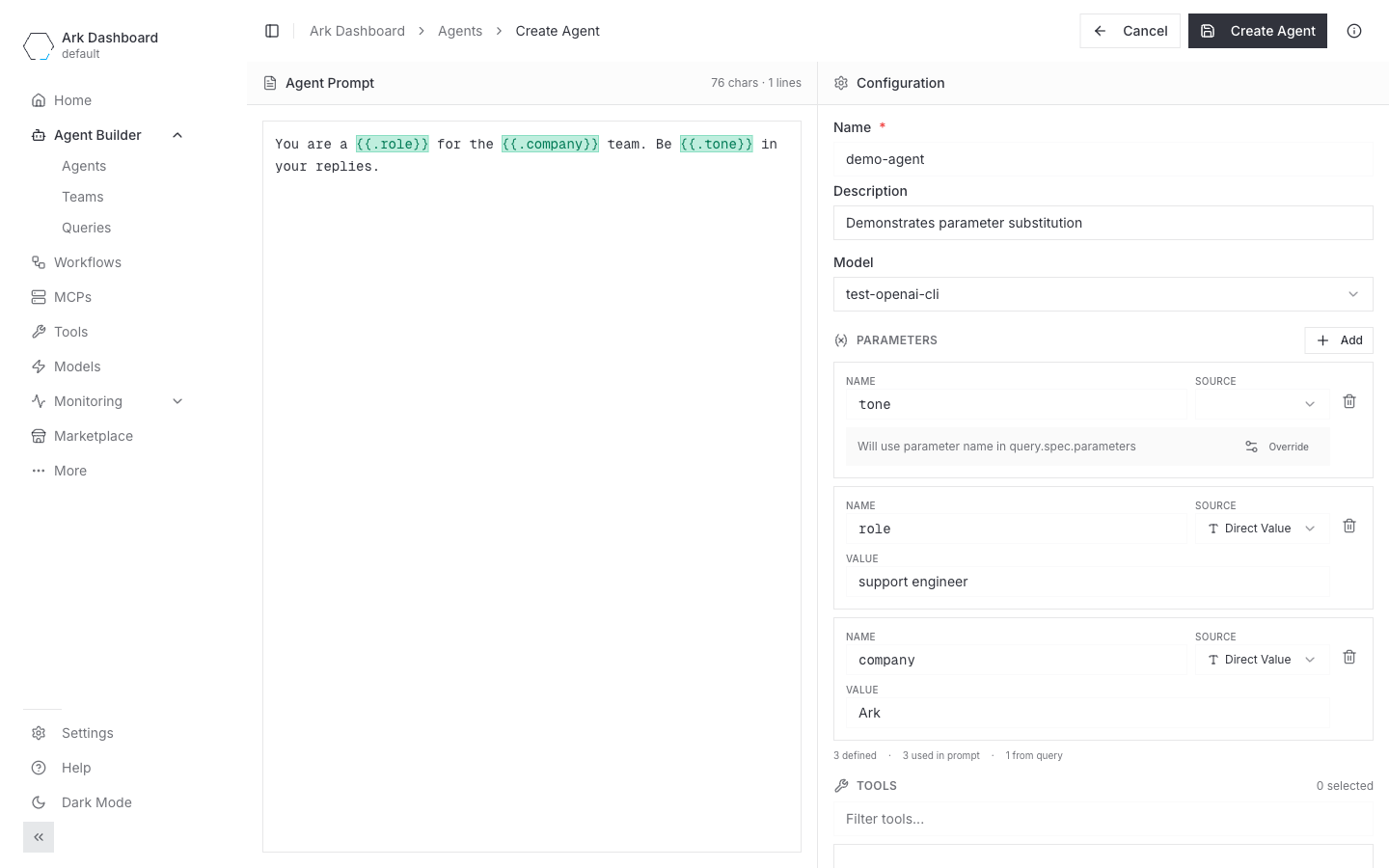
Use {{.paramName}} placeholders in the prompt and the form picks them up automatically. Try a prompt like:
You are a {{.role}} for the {{.company}} team. Be {{.tone}} in your replies.The PARAMETERS section flags every placeholder under Undefined parameters in prompt. Click each token to add a row, then choose the SOURCE for each:
Direct Value— bake a default into the agent. Useful for values that don’t change per query (e.g. company name).- (empty, the default) — the value must be supplied by the caller via
query.spec.parameters[]. Useful for per-query variation (e.g. tone, language, customer name). - Override — opens a “Name in query.spec.parameters” field so the agent’s
{{.tone}}can be sourced from a differently-named query parameter (e.g.voiceStyle).
The counter under the parameter list — N defined · N used in prompt · N from query — tells you at a glance whether anything is left undefined.
Via kubectl
cat <<'EOF' | kubectl apply -f -
apiVersion: ark.mckinsey.com/v1alpha1
kind: Agent
metadata:
  name: support-agent
spec:
  description: Handles customer support questions
  prompt: |
    You are a helpful assistant. Answer questions politely and concisely.
EOF
Wait for the agent to reach Available:
kubectl wait --for=condition=Available agent/support-agent --timeout=60s
kubectl get agent support-agent
A richer example: tools + parameters
The full YAML behind the Dashboard form above — three template parameters (role + company baked into the agent, tone supplied per query), plus a mix of tool types:
apiVersion: ark.mckinsey.com/v1alpha1
kind: Agent
metadata:
  name: demo-agent
spec:
  description: Demonstrates parameter substitution
  prompt: |
    You are a {{.role}} for the {{.company}} team. Be {{.tone}} in your replies.
  parameters:
    - name: role
      value: "support engineer"     # default baked into the agent
    - name: company
      value: "Ark"                  # default baked into the agent
    - name: tone
      valueFrom:                    # supplied by the caller at query time
        queryParameterRef:
          name: tone
  tools:
    - type: built-in
      name: terminate
    - type: http
      name: get-forecast            # references a Tool resource in the same namespace
    - type: mcp
      name: file-gateway-write-file # references a Tool the MCP controller created
tools[].type is one of built-in, http, mcp, agent, or team. Tools are referenced by name; the resource must exist in the namespace before the agent becomes Available.
Query an agent
Send a one-off query without creating a Query resource:
# Top-level form
ark query agent/support-agent "What's your refund policy?"

# Or via the agents subcommand
ark agents query support-agent "What's your refund policy?"
Or apply a Query resource (useful when you want the request persisted, or when you need streaming / parameters / overrides):
cat <<'EOF' | kubectl apply -f -
apiVersion: ark.mckinsey.com/v1alpha1
kind: Query
metadata:
  name: support-q1
spec:
  input: "What's your refund policy?"
  target:
    type: agent
    name: support-agent
EOF

# Watch it complete and read the response
kubectl get query support-q1 -w
kubectl get query support-q1 -o jsonpath='{.status.response.content}'
Pass parameter values at query time
If the agent declared parameters that must be supplied by the caller (valueFrom.queryParameterRef), the value comes from Query.spec.parameters[]:
apiVersion: ark.mckinsey.com/v1alpha1
kind: Query
metadata:
  name: demo-q1
spec:
  input: "Who are you and where do you work?"
  parameters:
    - name: tone
      value: "shakespearean prose"
  target:
    type: agent
    name: demo-agent
In the Dashboard’s Create Query form, once you pick the target the Parameters section shows a Required by agent badge for every parameter the agent expects from the query. Click the badge to add a row, fill in the value, and Execute Query. Defaults baked into the agent (role, company in the example above) do not appear — only the ones the caller must supply.
Heads up: query-supplied parameters work via
kubectland the Dashboard’s Queries tab today. Other surfaces will catch up soon.
Modify an agent
Edit interactively
kubectl edit agent support-agentPatch a single field
# Replace the prompt
kubectl patch agent support-agent --type='merge' -p='{"spec":{"prompt":"You are an expert support agent. Be thorough."}}'

# Change the model
kubectl patch agent support-agent --type='merge' -p='{"spec":{"modelRef":{"name":"gpt-4o-model"}}}'
Note: Patching
spec.toolswith--type='merge'replaces the entire tools array — it does not append. To append one tool, use a JSON patch. The/spec/tools/-path only works ifspec.toolsalready exists on the agent; if the field is unset, seed it with an empty array first:# One-time: create spec.tools if the agent was applied without it. kubectl patch agent support-agent --type='json' \ -p='[{"op":"add","path":"/spec/tools","value":[]}]' # Then append individual tools. kubectl patch agent support-agent --type='json' \ -p='[{"op":"add","path":"/spec/tools/-","value":{"type":"http","name":"get-forecast"}}]'
Re-apply the YAML
If the agent lives in a file, just kubectl apply -f again — the controller reconciles the diff.
List and inspect
# Quick list from the CLI
ark agents list

# Full kubectl view
kubectl get agents
kubectl describe agent support-agent
kubectl get agent support-agent -o yaml
The status reports whether the model and every referenced tool resolved. If Available=False, kubectl describe shows the missing dependency.
Delete
kubectl delete agent support-agent

# Or several at once
kubectl delete agents support-agent triage-agent

# All agents in the namespace
kubectl delete agents --all
Features only available in YAML
The Dashboard’s Create Agent form covers prompt, model, parameters, and tool selection. These features are only configurable via the Agent YAML for now:
spec.executionEngine— route execution to a custom executor (e.g., a Claude Agent SDK or LangChain executor) instead of the built-in completions engine. See the marketplace executors for ready-to-install options.spec.outputSchema— supply a JSON schema and the executor will return structured output instead of free-form text.spec.overrides— inject HTTP headers when the agent calls its model or any MCP server. Useful for upstream API gateways. See Overrides.spec.tools[].partial+tools[].functions— for MCP-server tools that expose many functions, list a subset so the agent only sees specific operations instead of the whole server.
For any of these, write the Agent YAML directly. You can still inspect and delete it from the Dashboard afterwards.
Troubleshooting
AVAILABLE: False after apply. Check the Available condition for the reason:
kubectl get agent support-agent -o jsonpath='{.status.conditions[?(@.type=="Available")].message}'Common causes:
Model 'default' is not available— set up a working model (see Models) or setspec.modelRef.nameto an existing model.Tool 'X' not found in namespace 'Y'— apply the referenced Tool resource first, or remove the reference fromspec.tools.
Ready for multi-agent coordination? Move on to Teams.