Models
A Model represents the configuration for a large-language model — OpenAI GPT, Azure OpenAI, AWS Bedrock, Anthropic Claude, or any OpenAI-compatible endpoint.
Every agent picks a model with spec.modelRef.name. If an agent doesn’t pin one, it falls back to the model named default in the same namespace. Keeping at least one model called default is the conventional starting point.
The full schema reference — every field, every provider, every auth method, custom headers, properties, and health-check status — lives at Reference → Models. This page walks you through the canonical setup and the two ways to do it.
Create the default model
The example below creates an OpenAI gpt-4o-mini model called default. You can do it from the Dashboard or with kubectl; pick whichever you prefer.
Via Dashboard
- Launch the dashboard:
ark dashboard. - Go to Models in the left nav and click Add Model.
- Fill the form:
| Field | Value |
|---|---|
| Name | default |
| Provider | OpenAI |
| Model | gpt-4o-mini |
| API Key | Pick an existing secret from the dropdown, or hit Add New to create one inline |
| Base URL | Add the model URL |
- Hit Create Model.
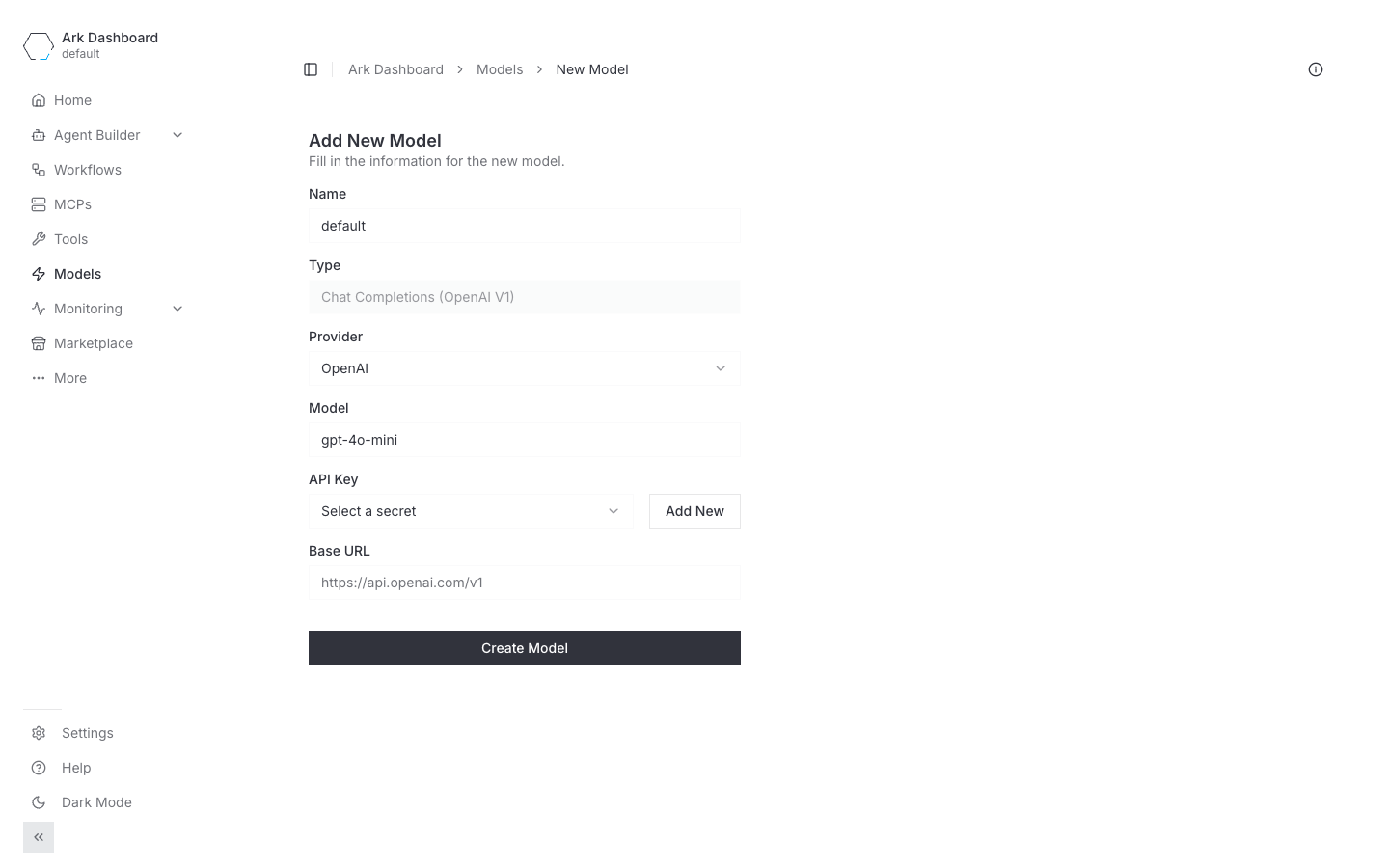
Base URL is picked from an existing Configuration, or created inline with Add New. Editing a model whose base URL is still a literal value (created via YAML, or before this picker existed) shows a Move to configuration button instead, which opens the same “create configuration” dialog pre-filled with that URL — useful for turning a one-off endpoint into something shared and swappable per environment. You can also leave that literal value as-is and edit unrelated fields; it’s only rewritten if you actually pick or create a configuration.
The form changes per provider:
- Azure OpenAI adds an Authentication dropdown (API Key / Managed Identity / Workload Identity) and an API Version field.
- AWS Bedrock adds an Authentication dropdown (IAM Credentials / API Key). IAM shows Access Key ID Secret and Secret Access Key Secret pickers; API Key shows a single API Key Secret picker. Both offer optional Region and Model ARN.
- Anthropic has the same shape as OpenAI plus an optional Anthropic Version field.
Via kubectl
# Store the API key in a Secret first.
kubectl create secret generic default-model-token \
  --from-literal=token='YOUR_OPENAI_API_KEY'

# Create the Model resource.
cat <<'EOF' | kubectl apply -f -
apiVersion: ark.mckinsey.com/v1alpha1
kind: Model
metadata:
  name: default
spec:
  provider: openai
  model:
    value: gpt-4o-mini
  config:
    openai:
      baseUrl:
        value: "https://api.openai.com/v1"
      apiKey:
        valueFrom:
          secretKeyRef:
            name: default-model-token
            key: token
EOF
The type field defaults to completions (chat completions) and is the only value the API server currently accepts, so it’s safe to omit.
Via the CLI generator
ark models create is an interactive shortcut that produces the same Model resource plus the backing Secret:
ark models create defaultIt prompts for provider, model name, base URL, API key, and (for Azure) API version. Flags let you skip prompts:
ark models create default \
  --type openai \
  --model gpt-4o-mini \
  --api-key sk-... \
  --yes
Verify the model is working
# List all models with their availability status
kubectl get models

# NAME      TYPE          PROVIDER   MODEL          AVAILABLE   AGE
# default   completions   openai     gpt-4o-mini    True        20s
Send a one-off query against the model to make sure credentials are correct:
ark query model/default "Explain how AI large language models work"Ark probes each model periodically (default every 1 minute, configurable via spec.pollInterval). When a probe fails, the ModelAvailable condition on the Model resource flips to False. See Model status and health checking for details.
Pick a provider
| Provider | When to use | Reference |
|---|---|---|
| OpenAI | OpenAI hosted models, or any OpenAI-compatible endpoint (Google Gemini in compatibility mode, vLLM, Ollama, custom gateways) | OpenAI |
| Azure OpenAI | Azure-hosted OpenAI deployments. Supports API Key, AKS Managed Identity, and Workload Identity authentication | Azure OpenAI |
| AWS Bedrock | Bedrock-hosted models (Anthropic Claude, Mistral, Cohere, etc.). Supports API-key (bearer token) or IAM credentials; uses the pod IAM role by default | AWS Bedrock |
| Anthropic | Native Anthropic API for Claude models | Anthropic |
The legacy form spec.type: openai|azure|bedrock|anthropic (using type as the provider) is deprecated. The mutating webhook migrates it to spec.provider automatically and stamps a ark.mckinsey.com/migration-warning/... annotation on the Model. New configs should use spec.provider.
Features only available in YAML
The Dashboard’s Add Model form covers the common case for each provider. These features are only configurable via the Model YAML for now:
- Per-request properties —
temperature,max_tokens,top_p,frequency_penalty,presence_penalty,stop,seed, and any other OpenAI Chat Completion parameter, supplied underspec.config.<provider>.properties. See Model Properties. - Custom HTTP headers —
spec.config.openai.headersandspec.config.azure.headers, supporting direct values and values loaded from Secrets / ConfigMaps. Useful for API gateways and custom auth. See Custom HTTP Headers. spec.pollInterval— health-check cadence (default1m). Only editable via YAML.- Bedrock session token —
spec.config.bedrock.sessionTokenfor temporary AWS credentials. - Bedrock IAM-role default — omitting
accessKeyId/secretAccessKeyentirely makes the controller use the pod’s IAM role. The Dashboard form requires explicit secrets. - Azure Workload Identity
clientId/tenantId— selectable in the form’s Authentication dropdown but the values themselves still come from YAML.
If you need any of the above, write the Model YAML directly and apply with kubectl. You can still inspect and delete it from the Dashboard afterwards.
Troubleshooting
Probes fail with invalid header field value for "Authorization". The API key in your Secret almost certainly ends with a newline. Go’s HTTP client rejects newlines in header values, so the controller can’t probe the model and ModelAvailable flips to False. Re-create the Secret with --from-literal (no newline) or strip whitespace before writing:
# Safer than --from-file when copy-pasting a key
kubectl create secret generic my-model-token \
  --from-literal=token='YOUR_API_KEY'

# Or strip any trailing whitespace from a file
tr -d '\n\r' < key.txt | kubectl create secret generic my-model-token \
  --from-file=token=/dev/stdin
kubectl describe model <name> shows the underlying probe error in the ModelAvailable condition.
Next steps
- Reference → Models — full schema, every provider, every field
- Agents — how
modelRefwires an agent to a model - Quickstart — get Ark and the
defaultmodel installed