Marketplace
The Marketplace tab in the Ark Dashboard is a catalog of installable add-on components — services, MCP servers, agents, executors, and demo bundles — that extend Ark without you having to write Helm charts from scratch. Each item is a Helm chart hosted in an OCI registry; the dashboard surfaces them in a card grid and gives you the exact terminal command to install one.
This page covers:
- How the Marketplace surface works end to end.
- How to register additional marketplace sources (your team’s, a vendor’s, etc.).
- How to publish your own marketplace items.
- Current limitations.
How the catalog works
The dashboard fetches one or more marketplace.json manifest files over HTTPS and renders the items it finds. The default source is the Ark Marketplace , which is pre-configured on every install.
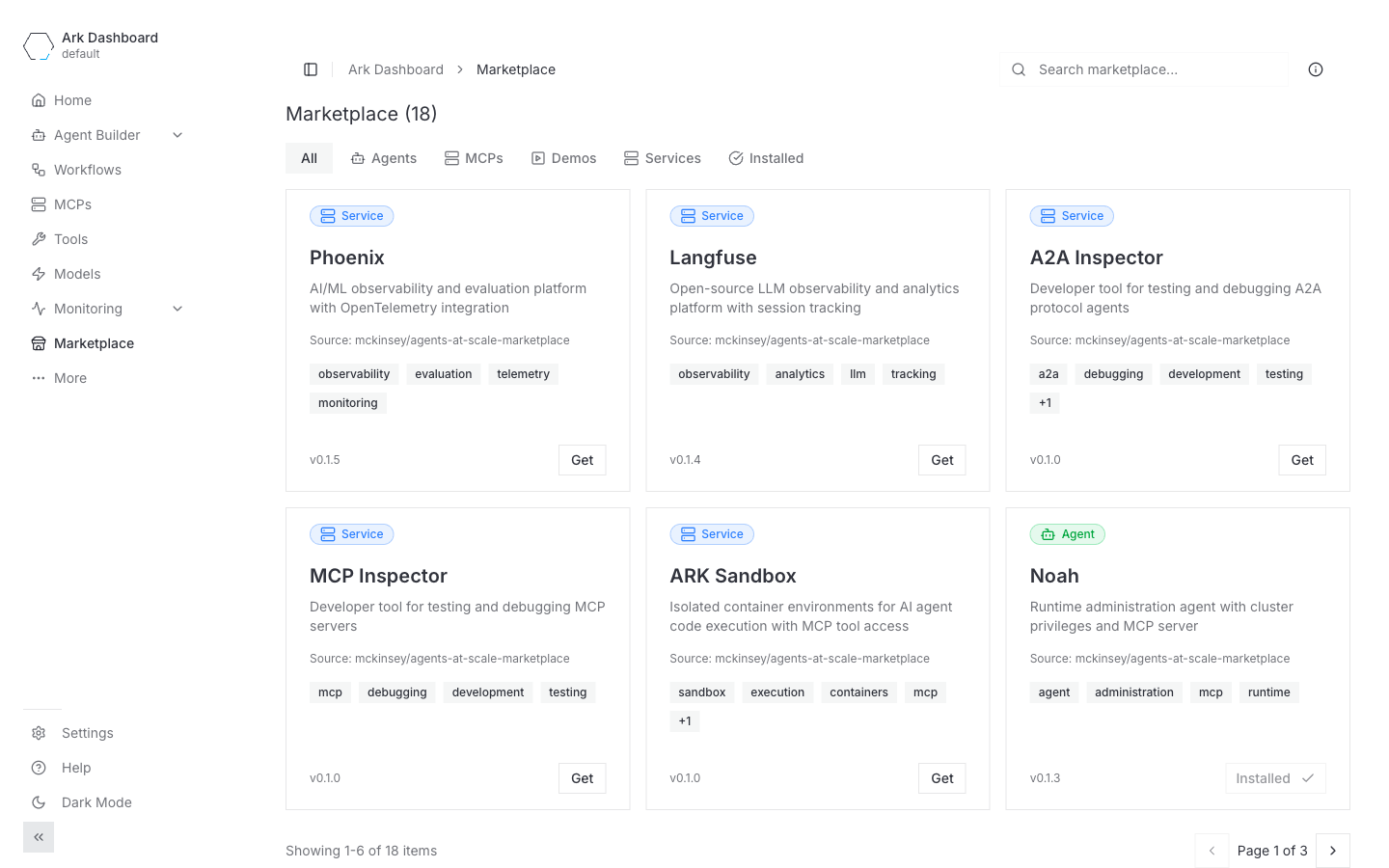
Each card shows:
- A type badge (
Service,Agent,MCP,Demo). - The item name, description, and source repository.
- Tags (free-form labels for search/filter).
- The advertised chart version.
- A Get button (or Installed if a helm release with the same name already exists in the cluster).
The filter strip at the top (All / Agents / MCPs / Demos / Services / Installed) narrows the grid. The search box in the top-right matches across name, description, and tags.
Install flow
Clicking Get does not install anything by itself. It opens a dialog with two terminal commands you can copy:
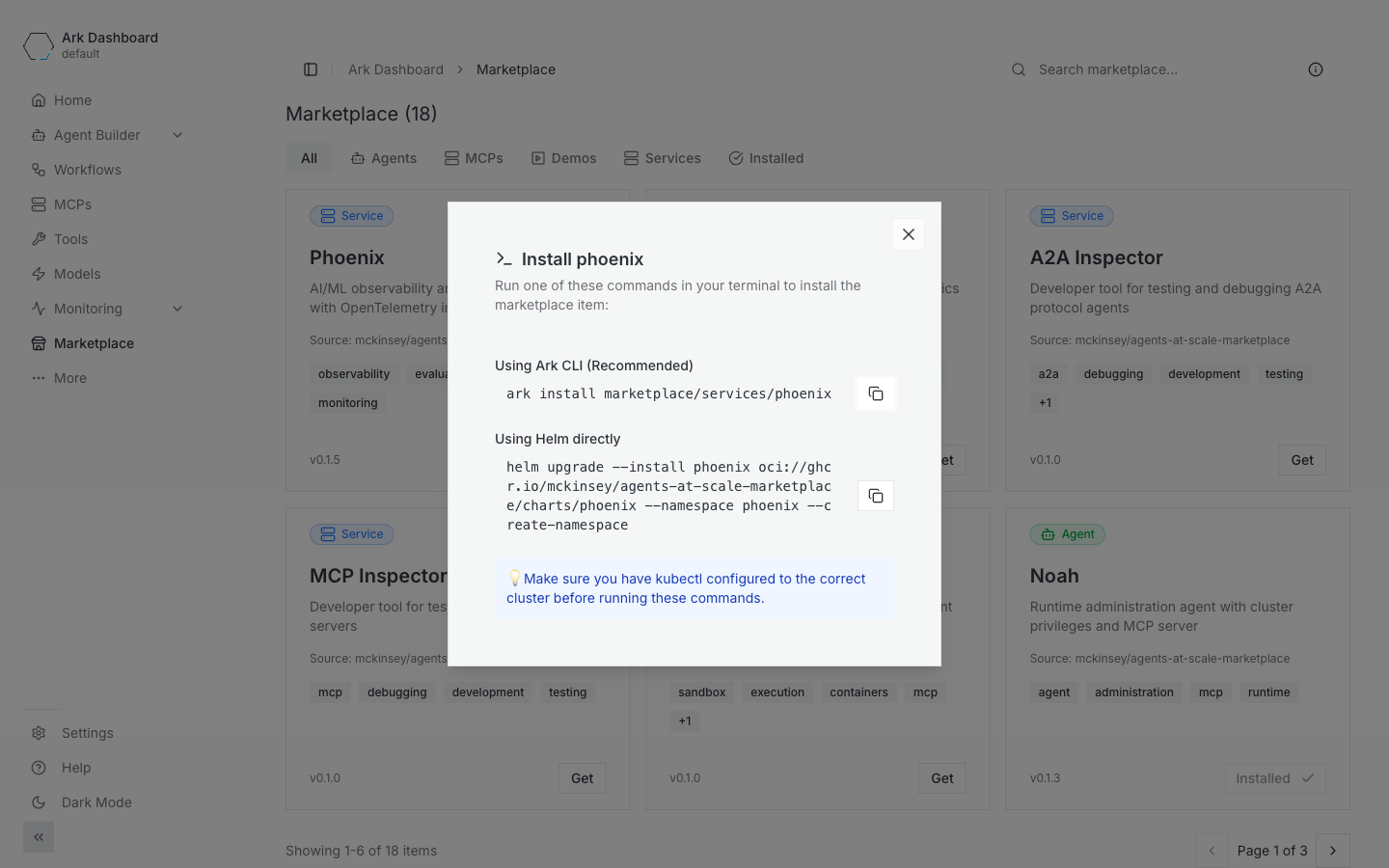
ark install marketplace/<category>/<name>— the recommended path. The Ark CLI reads the same manifest, resolves the OCI chart, and runshelm installwith the item’s declared namespace and install args.helm upgrade --install <name> oci://… --namespace <ns> --create-namespace— the direct Helm form, in case you don’t want to use the Ark CLI or need to override values.
Run whichever you prefer in a shell with kubectl configured against the target cluster, then come back to the dashboard — the card flips to Installed on the next refresh.
Add a new marketplace source
The default marketplace.json only lists items maintained by the Ark team. To browse items from another team or vendor, register their manifest URL as an additional source.
Enable the feature
Adding sources is gated behind an experimental flag. Open Settings → Experimental Features and turn on Marketplace (“Enables adding 3rd party Marketplaces from settings”).
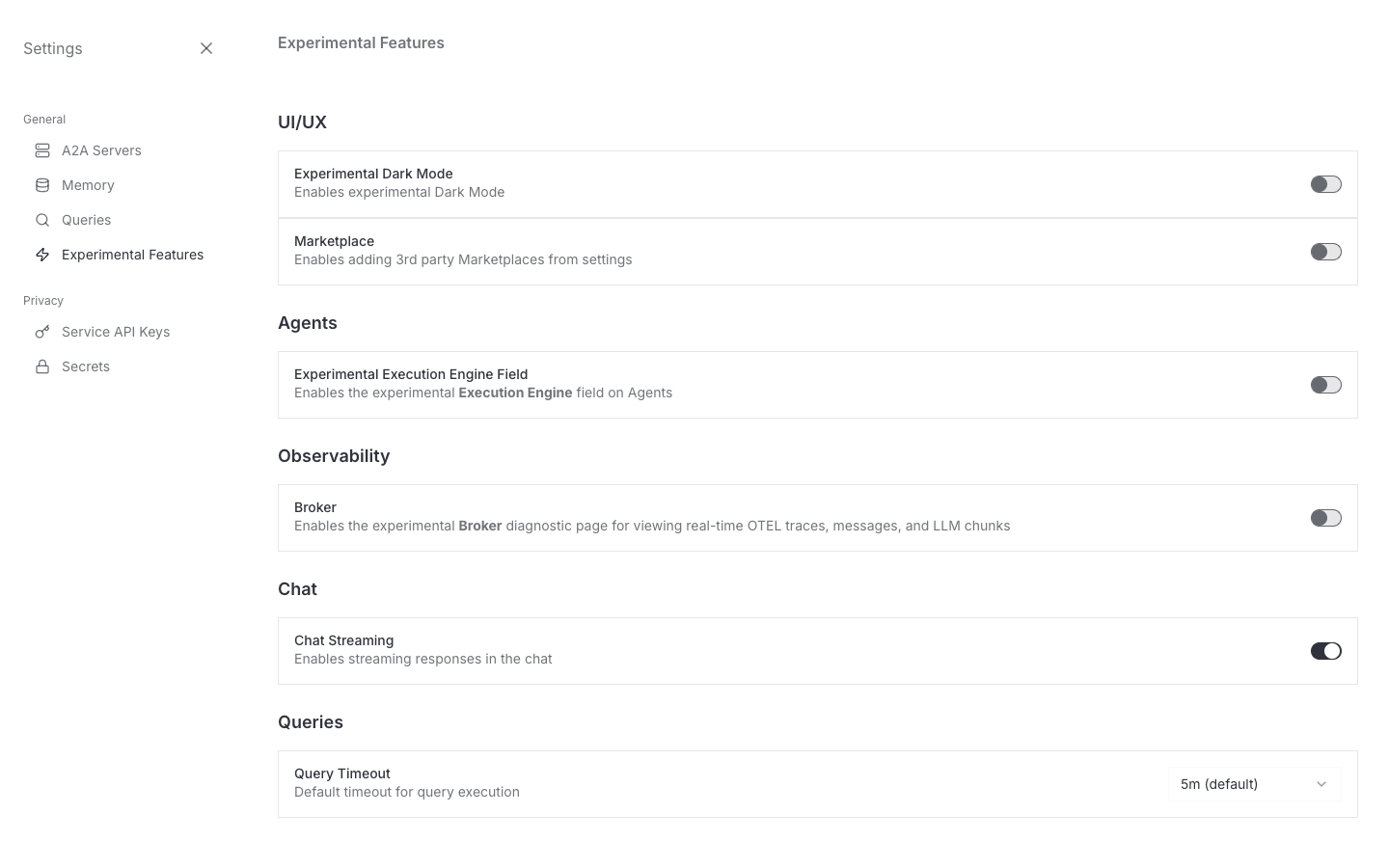
A new Manage marketplace entry appears in the Settings sidebar.
Add the source
Open Settings → Manage marketplace. The default Ark marketplace appears at the top with its canonical URL pinned.
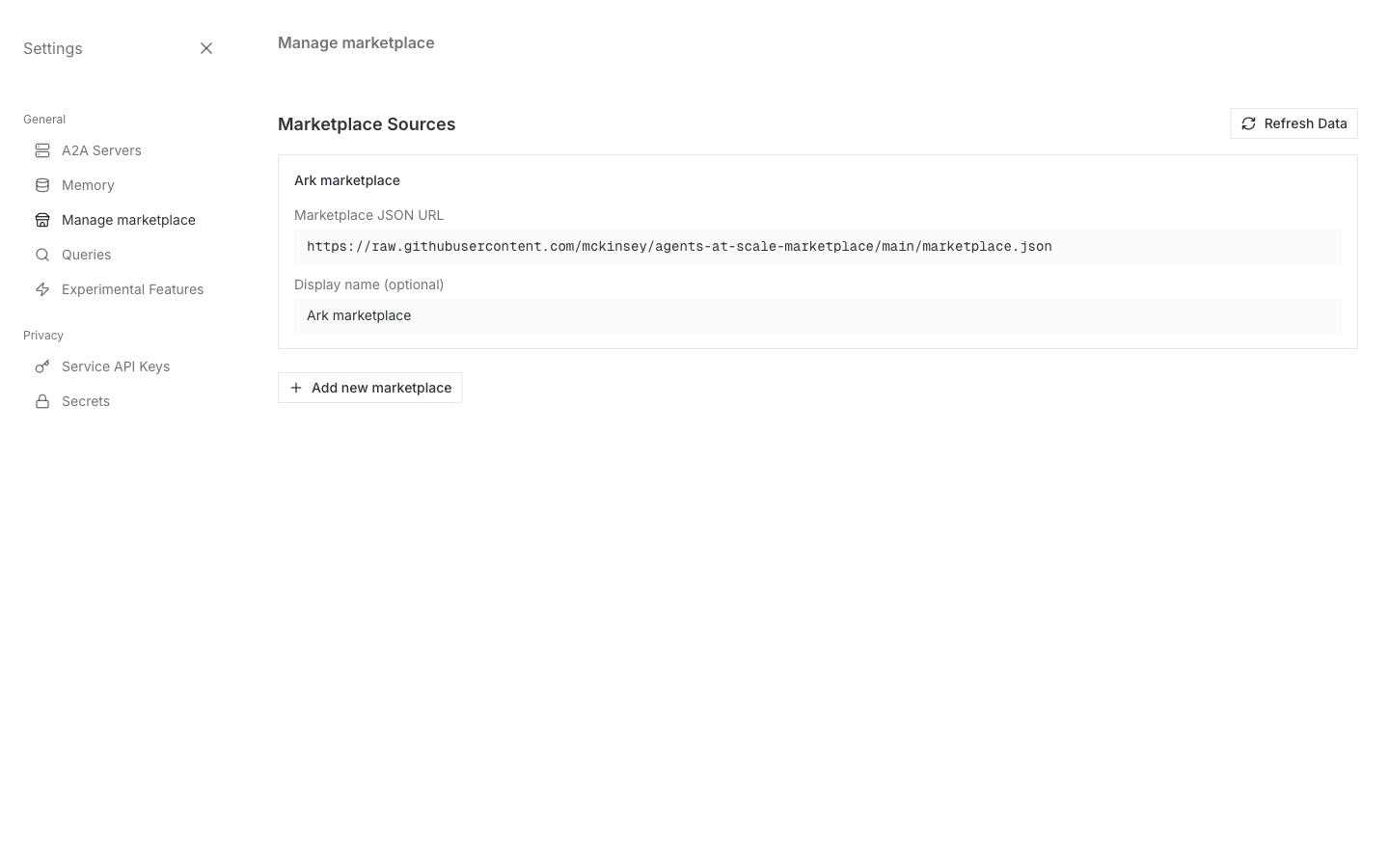
Click Add new marketplace to register a new one. The Marketplace JSON URL field opens with a mode toggle — Custom URL or Azure DevOps. Pick whichever matches how your manifest is hosted:
- Custom URL — any HTTPS manifest URL, public or authenticated (GitHub raw, GitHub Enterprise Server, artifact stores, etc.). See Custom URL.
- Azure DevOps — a preset for Azure DevOps Repos that builds the fetch URL from repo details instead of a free-text URL. See Azure DevOps.
Custom URL
This example adds a public source — leave Authentication on None; the authenticated case is covered right after, in Add an authenticated source.
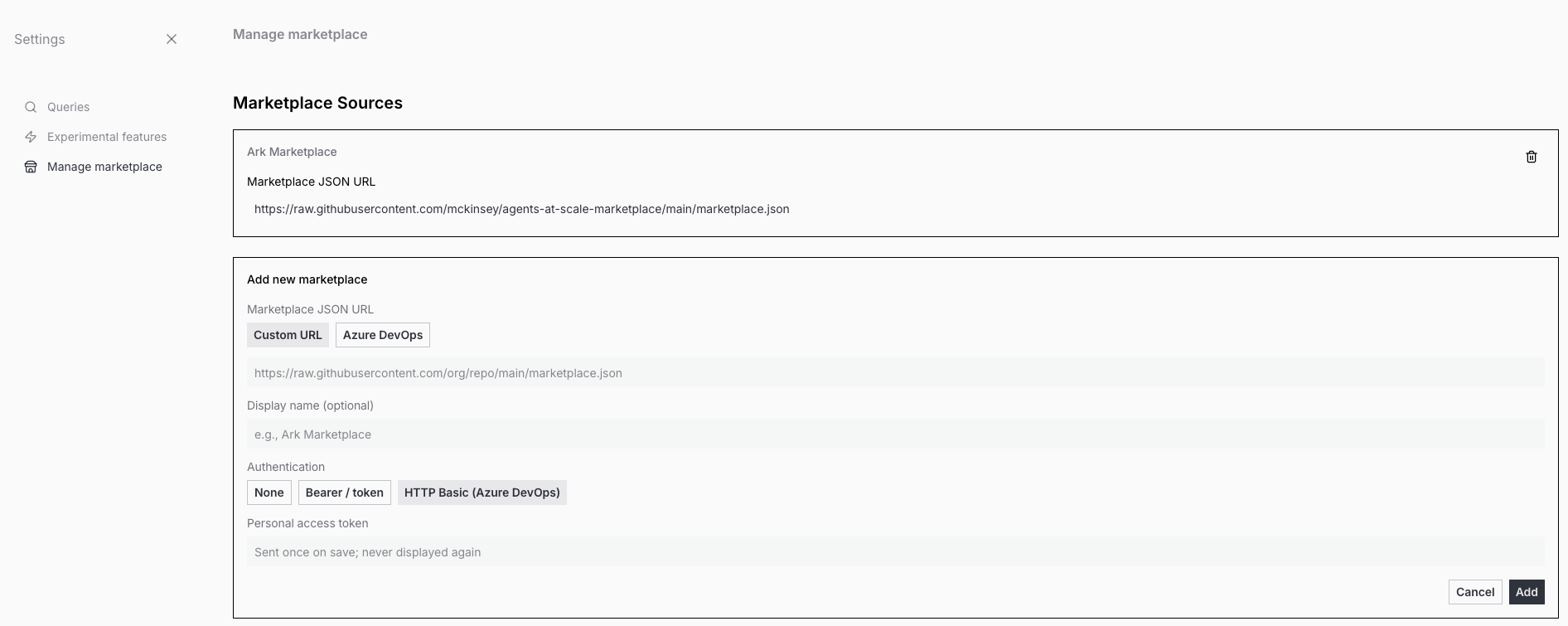
| Field | Notes |
|---|---|
| Marketplace JSON URL | Required. HTTPS URL that returns a JSON manifest in the schema below. Common pattern: https://raw.githubusercontent.com/<org>/<repo>/main/marketplace.json. |
| Display name | Optional label shown in the sidebar and item cards. Defaults to the marketplace field inside the manifest. |
| Authentication | Leave on None for a public manifest — ark-api fetches it with no Authorization header, and the Token field stays empty. For a private source, see Add an authenticated source below. |
Azure DevOps
Azure DevOps Repos has no “Raw” file URL, so Custom URL mode would otherwise require hand-building the Items API URL yourself. Switching the Marketplace JSON URL toggle to Azure DevOps replaces the free-text field with the repo details and builds that URL for you:
| Field | Notes |
|---|---|
| Organization | The Azure DevOps organization name, from https://dev.azure.com/<org>/.... |
| Project | The project name within the organization. |
| Repository | The Git repository name within the project. |
| Branch | Defaults to main. Change it to target a different branch. |
| Path | Defaults to /marketplace.json. Change it if the manifest lives elsewhere in the repo. |
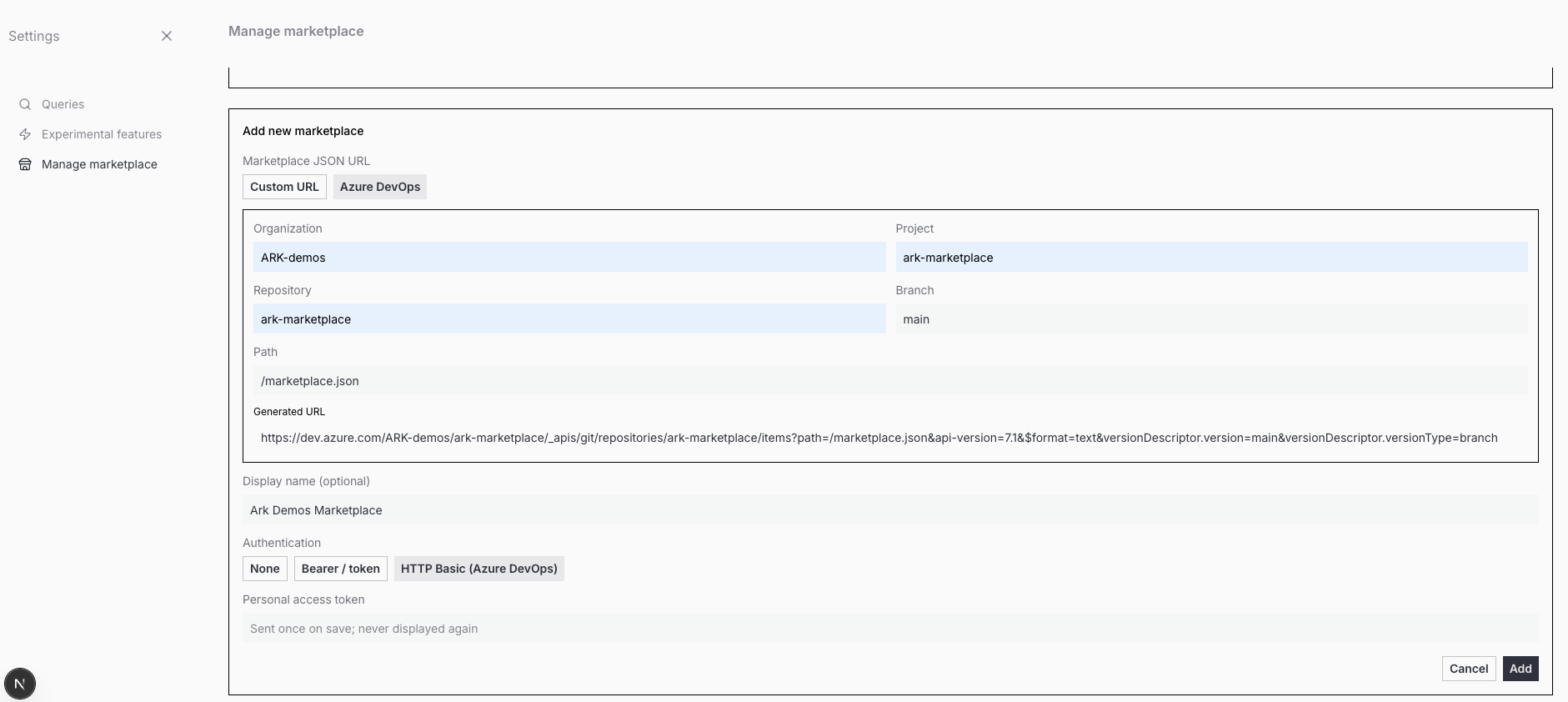
As you fill in Organization, Project, and Repository, the dashboard shows a read-only Generated URL preview of the raw-fetch URL it will submit, URL-encoded for you. Selecting Azure DevOps mode also auto-selects the HTTP Basic (Azure DevOps) authentication scheme, since Azure DevOps Repos requires a credential even for the manifest fetch — paste your PAT into the Token field and hit Add.
Example. Suppose you have a private Azure DevOps repository as illustrated below:
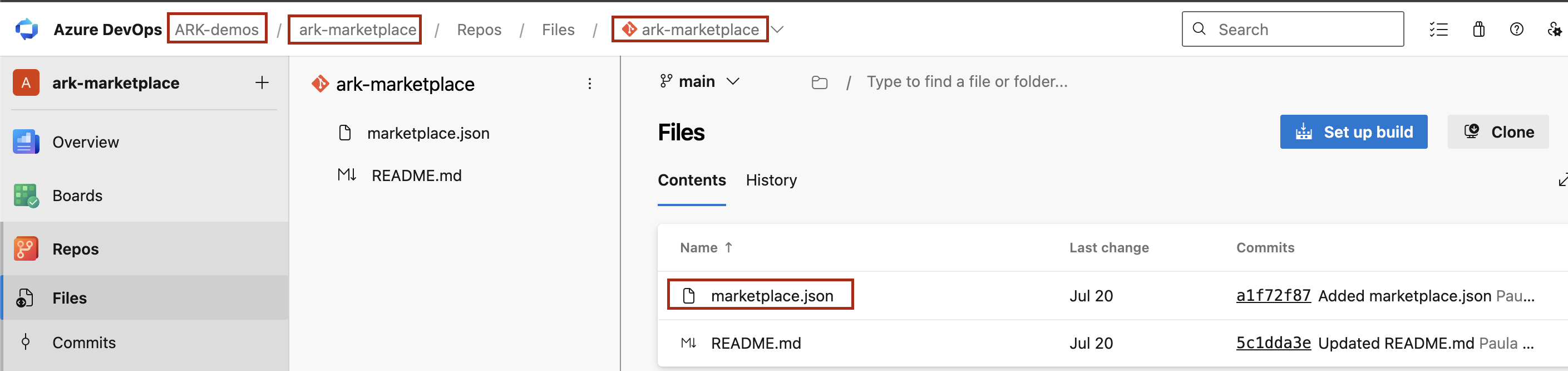
You can add it as a marketplace source by filling in the form as shown below. The path to the marketplace manifest is /marketplace.json in this example, but it could be any other path in the repository:
Save the source
Hit Add. The dashboard checks the URL format, then sends the source to ark-api, which validates the URL and saves it to the namespace’s marketplace-sources ConfigMap.
(For an authenticated source, ark-api also test-fetches the manifest with the credential before saving — see Add an authenticated source.)
On the next reload of the Marketplace tab you’ll see the new items alongside the defaults.
The Refresh Data button at the top of the Manage marketplace page re-pulls every source on demand without a page reload.
Add an authenticated source
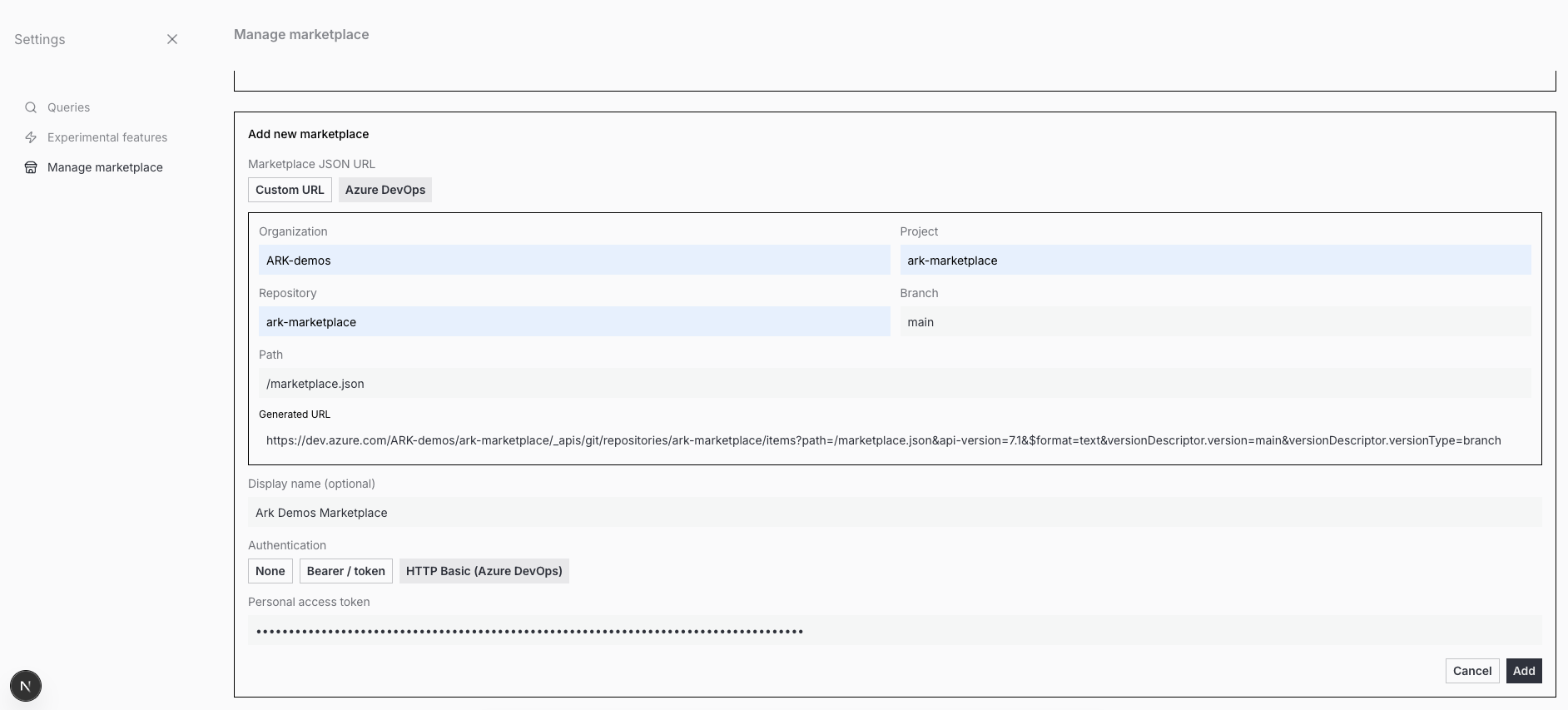
If the manifest sits behind authentication — a private GitHub/GHES repo, an Azure DevOps repo, or an authenticated artifact store — the Add new marketplace form exposes an Authentication selector and a Token field alongside the URL fields described above:
| Field | What it does |
|---|---|
| Authentication | Public source — select None. GitHub raw, GitHub Enterprise, or an artifact store (Artifactory, Nexus, Harbor) — select Bearer / token. Azure DevOps Repos — select HTTP Basic (Azure DevOps). |
| Token | The credential for the chosen scheme. Sent once on save, masked in the field, validated against the manifest before the source is saved, and never displayed again. |
Pick the scheme your host expects — Bearer / token for GitHub-style hosts, HTTP Basic for Azure DevOps — paste the token, and hit Add. ark-api stores the token in a Kubernetes Secret and attaches the header server-side, so the browser never holds it. For who is allowed to use a shared authenticated source and the security model, see Authenticated sources.
Finding the manifest URL on your host
The URL must return the raw manifest bytes, not an HTML file-viewer page.
- GitHub — open the file and click Raw, then copy the address:
https://raw.githubusercontent.com/<org>/<repo>/<branch>/marketplace.json(private repos need a Bearer / token credential). - Azure DevOps Repos — there is no “Raw” button. Don’t build the URL by hand — use the Azure DevOps mode: enter the organization, project, repository, branch, and path, and the dashboard builds and URL-encodes the fetch URL for you, with a preview before you save. Use a PAT scoped to Code: Read; the Azure DevOps mode auto-selects HTTP Basic auth for you.
marketplace.json schema
A minimal valid manifest looks like this:
{
  "version": "1.0.0",
  "marketplace": "my-team-marketplace",
  "items": [
    {
      "name": "support-agent",
      "type": "agent",
      "displayName": "Support Agent",
      "description": "Demo customer-support agent with FAQ retrieval tooling",
      "version": "0.1.0",
      "category": "agents",
      "tags": ["agent", "support", "demo"],
      "license": "Apache-2.0",
      "homepage": "https://github.com/my-org/support-agent",
      "documentation": "https://my-org.github.io/support-agent/",
      "ark": {
        "chartPath": "oci://ghcr.io/my-org/charts/support-agent",
        "namespace": "default",
        "helmReleaseName": "support-agent",
        "installArgs": ["--create-namespace"]
      }
    }
  ]
}
The chart this points at should bundle the Agent CRD (and any Model, Tool, or MCPServer resources the agent depends on) so that one helm install produces a working, queryable agent.
A well-formed manifest follows three rules:
- The top-level object must have
version,marketplace, anditems[]keys. - Every item must have at least a
name. - The whole document must be valid JSON returned with HTTP 200.
These describe what a valid manifest needs; they are not a save-time gate. ark-api stores the source once the URL validates, and a malformed or unreachable manifest surfaces as missing or broken items when the catalogue is fetched (an authenticated source is the exception — its manifest is test-fetched with the credential before saving).
Beyond that, populate the optional fields for a good catalog entry:
| Field | Purpose |
|---|---|
type | service, agent, mcp, demo, or executor. Drives the badge colour and the top-bar filter. |
category | One of observability, tools, mcp-servers, agents, models, workflows, integrations. Used by the CLI’s ark install marketplace/<category>/<name> path. |
displayName, description, tags, icon | All show in the card. Search matches name + description + tags. |
version | Free-form string shown in the card footer. Track your chart version here. |
documentation, homepage, repository, support.url | Outbound links from the detail card. |
ark.chartPath | Required for install to work. The OCI URL the install command will pass to Helm. |
ark.namespace | Helm --namespace value. |
ark.helmReleaseName | Release name. The Installed filter matches by this name. |
ark.installArgs | Extra flags appended verbatim to the install command. Typical: ["--create-namespace"]. |
ark.k8sServiceName, k8sServicePort, k8sDeploymentName | Optional metadata used by the Ark CLI to wire port-forwards after install. |
What needs to be reachable by the dashboard?
Only the manifest itself sits on a critical path.
| Field | Fetched by | Hosting requirement |
|---|---|---|
| The manifest URL | ark-api, server-side | Must be reachable from the cluster. Anonymous by default; a source can carry a credential for authenticated fetch (see Authenticated sources). |
ark.chartPath (OCI) | The user’s local helm CLI | Doesn’t have to be public. If the registry is private, users run helm registry login first. Public OCI registries just remove that step. |
“Reachable” doesn’t mean internet-public — it just means ark-api can GET the URL from the cluster, either anonymously or with a configured credential (see Authenticated sources). Common anonymous patterns:
- Public HTTPS — e.g.
https://raw.githubusercontent.com/{owner}/{repo}/{branch}/marketplace.jsonfor a public GitHub repo. Anyone on the internet, including the dashboard pod, can fetch it. - Internal GitHub Enterprise Server — a repo on a corp-network GHES instance with anonymous read enabled. The cluster needs network routing to the GHES host.
- Internal artifact repo — Artifactory / Nexus / Harbor serving the file at a static URL with anonymous read enabled, reachable from the cluster.
- In-cluster
ConfigMap+ nginx (or similar) — the manifest lives in aConfigMap, an in-clusterServiceserves it athttp://marketplace.my-ns.svc.cluster.local/marketplace.json. Zero internet egress required — ideal for air-gapped installs.
raw.githubusercontent.comis GitHub’s host for raw file contents in public repos. A file athttps://raw.githubusercontent.com/{owner}/{repo}/{branch}/{path}is fetchable by anyone over HTTPS with no auth, which makes it a low-effort way to publish a manifest without setting up GitHub Pages or a CDN. Private repos return 404 from this host for anonymous fetches; to use one, register the source with a credential (see Authenticated sources).
Practical implication: for a fully-internal marketplace, you need exactly one URL the dashboard pod can fetch — the manifest, anonymously or with a credential. Charts can live in your private OCI registry.
Publish your own marketplace items
To make a new item installable from the dashboard:
- Build and publish a Helm chart to an OCI registry your users can pull from. The official marketplace pushes to
ghcr.io/mckinsey/agents-at-scale-marketplace/charts/<name>; any OCI-compatible registry (Harbor, ECR, Artifactory) works. - Add an entry to a hosted
marketplace.jsonwith the fields above. Pointark.chartPathat the OCI URL from step 1. - Share the manifest URL with users — they paste it into Settings → Manage marketplace and your items appear in their dashboard.
The official marketplace publishes via GitHub Actions on push to main — use that repo’s workflows as a starting point for your own pipeline.
Authenticated sources
A source whose manifest needs authentication can carry a credential. ark-api attaches the header server-side; the credential is stored in a Kubernetes Secret, never shown in the browser, and never logged. Two schemes are supported:
- Bearer / token — private GitHub raw, GitHub Enterprise Server, and artifact stores (Artifactory, Nexus, Harbor).
- HTTP Basic — Azure DevOps Repos (empty username + a Personal Access Token).
To add one from the dashboard, see Add an authenticated source above.
Who can use it
ark-api reads the credential Secret under your identity, so you can only use a source whose credential Secret you are allowed to read. A shared authenticated
source resolves only for users granted get on its credential Secret — typically a viewer-group RoleBinding. A user without that access sees an “authentication failed” error for the source instead of its items.
Editing a source’s URL requires re-entering the credential.
For the ConfigMap/Secret shapes, RBAC, and deploy-time seeding via Helm, see Marketplace Sources.
Limitations
Things the Marketplace tab does not do today. Track these before relying on it for production rollout:
- No in-dashboard install. Clicking Get generates a terminal command; the user still has to paste and run it in a shell with
kubectlconfigured. There’s no progress bar or status tracking for in-progress installs. - The “Marketplace” sources UI is experimental. It’s hidden until you flip the toggle under Settings → Experimental Features → Marketplace. Until that lands as a default, document the toggle for your users.
- No version selector. Each item card shows a single advertised version from the manifest, and
ark installuses whatever tag the OCI chart reference resolves to. To pin to an older version, use the Helm command form with an explicit--version. - “Installed” detection matches by helm release name. The badge compares
ark.helmReleaseNameagainst helm releases in the cluster. If you installed the chart under a different release name, the card still says Get. - No client-side schema enforcement. The validate endpoint checks only that
version,marketplace, anditems[].nameexist. Items missingark.chartPathshow in the grid but produce a broken install command; missingtype/categoryproduce a card with no badge or filter membership.