Phoenix
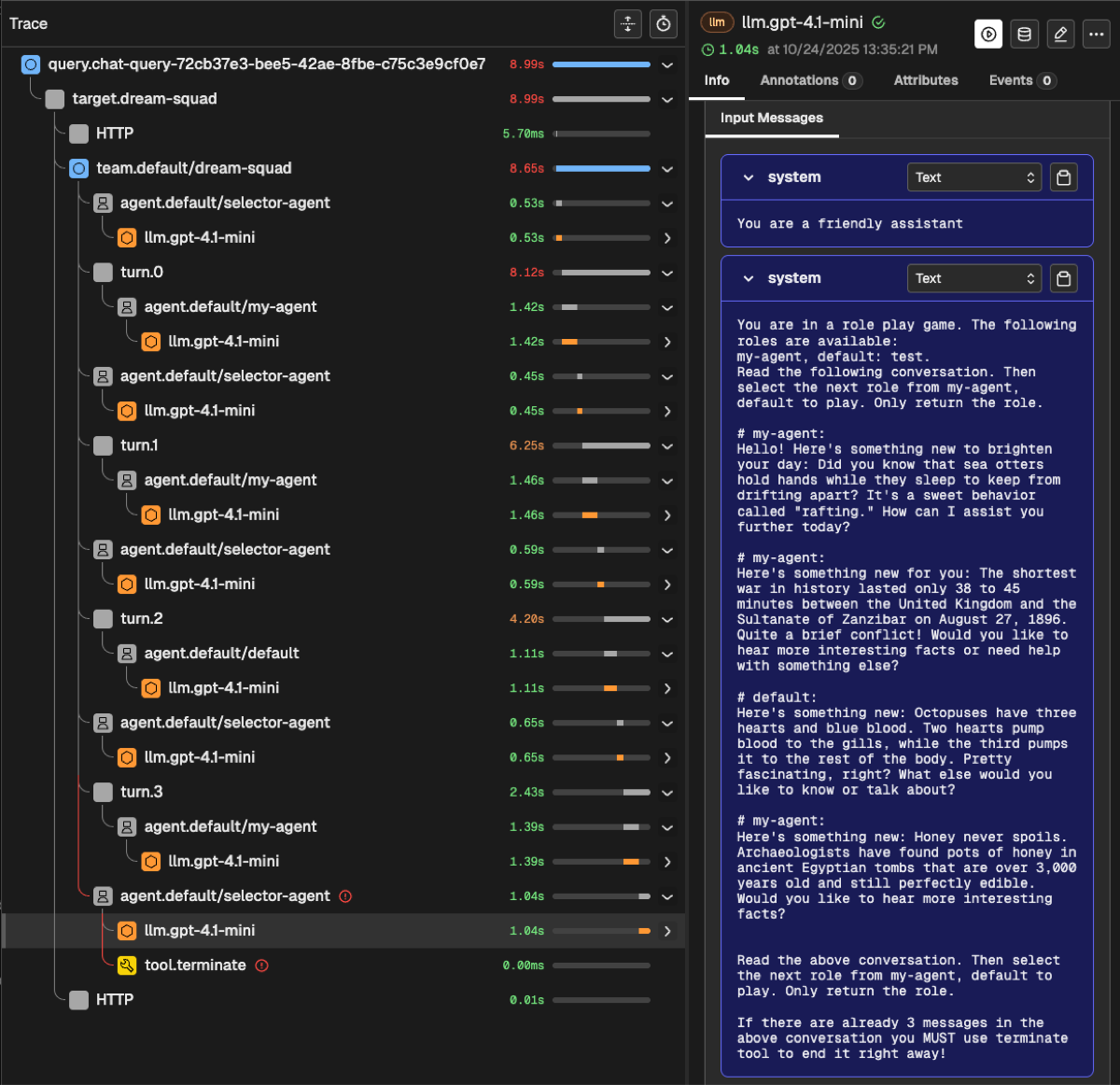
Arize Phoenix is an open-source AI/ML observability and evaluation platform that provides comprehensive tracing, performance monitoring, and model evaluation capabilities.
Overview
Phoenix integration with ARK provides:
- OpenTelemetry Tracing: Automatic trace collection from ARK agents and services
- LLM Observability: Track token usage, latency, and model performance
- Evaluation Framework: Assess agent responses and behavior
- Interactive Dashboard: Visualize traces, metrics, and evaluation results
- Multi-namespace Support: OTEL environment variables automatically configured
Note: Compatible with Phoenix versions 4.0.x and later.
Quick Start
Installation
Using DevSpace (Recommended for Development):
cd services/phoenix
devspace deployNote: DevSpace automatically restarts the ARK controller after deployment to ensure it picks up the new Phoenix configuration.
Using Helm:
cd services/phoenix
helm dependency update chart/
helm install phoenix ./chart -n phoenix --create-namespace
Access Dashboard
With DevSpace:
cd services/phoenix
devspace dev
# Then port-forward to access dashboard:
kubectl port-forward -n phoenix svc/phoenix-svc 6006:6006
# Open http://localhost:6006
With kubectl:
kubectl port-forward -n phoenix svc/phoenix-svc 6006:6006
# Open http://localhost:6006
Configuration
Default Configuration
Phoenix is deployed with these defaults:
- Namespace:
phoenix - Service Name:
phoenix-svc - Port:
6006 - OTEL Endpoint:
http://phoenix-svc.phoenix.svc.cluster.local:6006/v1/traces
OTEL Environment Variables
Phoenix automatically creates Kubernetes secrets with OTEL environment variables in configured namespaces (default: ark-system and default).
The secret otel-environment-variables contains:
PHOENIX_COLLECTOR_ENDPOINT: http://phoenix-svc.phoenix.svc.cluster.local:6006
PHOENIX_CLIENT_HEADERS: ""
PHOENIX_PROJECT_NAME: default
Using OTEL Secrets in Deployments
Add to your deployment’s container spec:
envFrom:
  - secretRef:
      name: otel-environment-variables
optional: trueNote: When using DevSpace, the ARK controller is automatically restarted after Phoenix deployment. For manual deployments, existing deployments must be restarted to pick up new/updated secrets:
# Only needed for manual deployments (not DevSpace)
kubectl rollout restart deployment/ark-controller -n ark-system
Custom Configuration
Customize Phoenix by modifying chart/values.yaml:
# Enable HTTPRoute for Gateway API routing
httpRoute:
  enabled: true
  hostnames:
    - "phoenix.example.com"

# Add OTEL secrets to additional namespaces
otelEnvironmentVariableSecrets:
  enabled: true
  namespaces:
    - ark-system
    - default
    - my-custom-namespace

# Configure Phoenix settings
phoenix-helm:
  auth:
    enableAuth: true  # Enable authentication
  service:
    type: LoadBalancer  # Expose externally
Troubleshooting
Dashboard Not Accessible
Check if Phoenix is running:
kubectl get pods -n phoenix
kubectl get svc -n phoenix
Verify port-forwarding:
kubectl port-forward -n phoenix svc/phoenix-svc 6006:6006No Traces Appearing
- Verify OTEL endpoint is configured correctly
- Check that applications are instrumented with OpenTelemetry
- Ensure OTEL secrets are mounted in your deployments
- When using manual deployment methods, restart deployments after updating secrets:
# Only needed for manual deployments (DevSpace handles this automatically)
kubectl rollout restart deployment/ark-controller -n ark-system
OTEL Secrets Not Created
Check if the secret exists:
kubectl get secret otel-environment-variables -n ark-systemIf missing, verify otelEnvironmentVariableSecrets.enabled: true in values.yaml and redeploy.
Uninstallation
Using DevSpace:
cd services/phoenix
devspace purge
Using Helm:
helm uninstall phoenix -n phoenix
kubectl delete namespace phoenix  # Optional: remove namespace